System design means deciding how the parts of an application work together. It covers where data lives, how requests move, and what happens when something breaks.
You do not need to memorize dozens of tools to get started. These seven pillars give you a useful starting point. Each answers a different question about building software that people can depend on. They also help you explain your choices in a system design interview.
New to a term? Words with a dotted underline show a short definition when you hover over them or tap them, so you never need to leave the page.
What system design really means
More than drawing boxes
A system design is a plan for how software will meet its goals in the real world. It names the main parts, such as , , , and . It also explains how those parts talk to each other and why each one is there.
Code describes how one piece behaves. System design describes how all the pieces behave together, under real traffic, on real machines, with real users.
Two kinds of requirements
Every design starts with requirements, meaning the things the system must do or be.
- Functional requirements describe what the system does. For example: users can upload a photo, and friends can see it.
- Non-functional requirements describe how well it does that. For example: photos load in under one second, and the service stays up during busy hours.
Most system design decisions come from the second list. Almost any design can upload a photo. The hard part is doing it quickly, safely, and cheaply for millions of people.
Every choice is a trade-off
A trade-off means gaining one quality by giving up some of another. There is rarely a perfect answer. There is only the best answer for a given situation.
A few common trade-offs:
- Speed versus freshness. A cache returns answers quickly, but it may serve slightly old data.
- Consistency versus availability. Making every copy of the data agree can mean refusing some requests when servers cannot reach each other.
- Simplicity versus scale. One server is easy to run. Many servers handle more traffic, but they add moving parts.
- Cost versus resilience. Backup servers in another protect against outages, but you pay for machines that mostly sit idle.
What decides the right trade-off
The right choice depends on conditions, not on a favorite tool. Ask these questions before picking one:
- How many users, and how fast is that number growing? A design for 1,000 users can be much simpler than one for 10 million.
- What does a mistake cost? A bank balance must be correct. A like counter can be off by a few for a moment.
- How fast must it feel? A search box needs instant answers. A monthly report can take minutes.
- What is the budget? Extra servers, regions, and tools all cost money every month.
- Who will run it? A small team may move faster with a simple design it fully understands.
A good engineer states these conditions out loud, then explains which qualities matter most and what they are willing to give up.
Murphy’s law: plan for things to break
Murphy’s law says: anything that can go wrong will go wrong. It is a joke, but in system design it is also a working rule.
Run enough machines for long enough, and failure stops being rare. Disks wear out. Networks drop messages. A ships a bug. A goes down at the worst possible moment. At scale, something is always broken somewhere.
Murphy’s law has a few well-known companions, and each one maps to a design habit:
- “Anything that can go wrong will go wrong.” Assume every part can fail. Add , , backups, and spare capacity so one failure does not take everything down.
- “Nothing is as easy as it looks.” A simple feature often hides hard questions. What happens if two users edit the same record at once?
- “Everything takes longer than you think.” Networks are slower than they seem on your laptop. Budget time for every call between services.
- “If there is a worse time for something to go wrong, it will happen then.” Failures cluster around traffic spikes, launches, and holidays. Test your system under heavy load before real users do it for you.
The goal is not to prevent every failure. That is impossible. The goal is to make failures small, visible, and quick to recover from.
Where the seven pillars fit
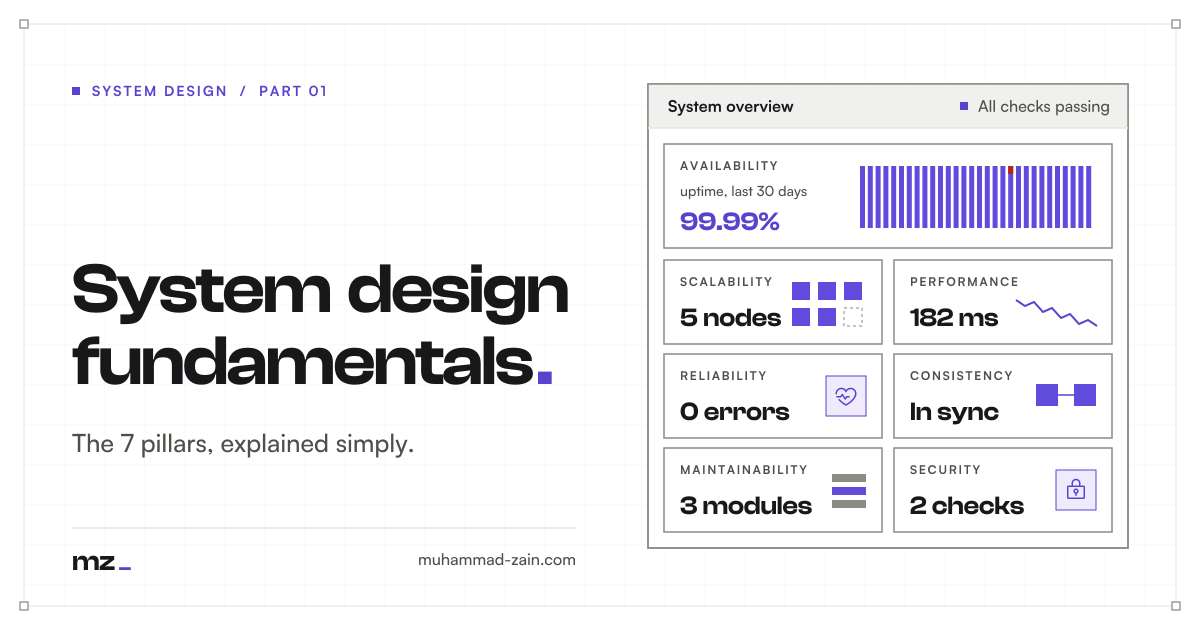
The seven pillars below are the qualities you trade against each other. Each section starts with a plain definition and why it matters. Then it digs into the core techniques, how they work, and what each one costs. It ends with the trade-offs, a simple example, and a short list of key terms to remember.
To make each pillar easier to picture, we will follow one running analogy: a small neighborhood bakery that grows into a busy chain. Every pillar is a problem that bakery has to solve.
Scalability
What it is
Scalability means your system can take on more work without falling over. More people sign up, more requests arrive, more data piles up, and the app keeps working just as well.
A scalable system grows by adding resources, not by being rebuilt from scratch. It answers one question: what happens when ten times more people show up?
In the bakery: A small bakery serves 50 customers a day. Then a food blogger posts about it, and 500 people arrive. A scalable bakery can keep up, either by buying a bigger oven or by opening a second branch. An unscalable one sells out by 9 a.m. and turns everyone else away.
Why it matters
Growth rarely arrives smoothly. A launch, a viral post, or a holiday sale can multiply traffic in hours. A system that cannot scale slows down, throws errors, or goes offline exactly when the most people are watching.
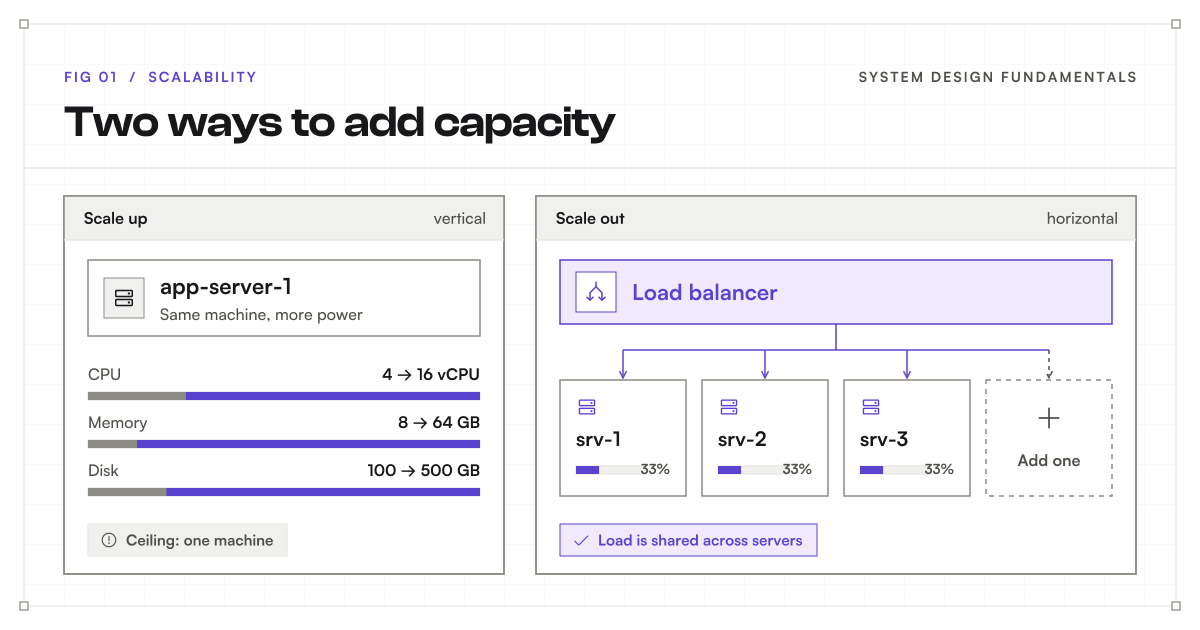
Vertical scaling (scale up)
means making one more powerful. A server is a computer that handles requests. You give the machine you already have more (processing power), more memory, or a faster disk.
How it works. Your application stays exactly the same. It simply runs on a bigger machine. Most cloud providers let you resize a server in a few minutes.
Strengths. It is the simplest way to grow. There is no new code, no coordination between machines, and nothing new to monitor.
Limits. Every machine has a maximum size, and the biggest ones are very expensive. Resizing often needs a restart, which means a short outage. And one machine is still one point of failure: if it breaks, everything stops.
Use it when you are small or early, when one machine is clearly the bottleneck, or when the software is hard to split, as many traditional are.
Horizontal scaling (scale out)
means adding more servers that share the work. Instead of one big machine, you run many ordinary ones side by side.
How it works. A load balancer sits in front of the servers. Every request reaches it first, and it forwards each one to a server. Common strategies include round robin, which takes turns, and least connections, which picks the server with the fewest active requests. The load balancer also stops sending traffic to servers that fail their .
Strengths. There is almost no ceiling: when you need more capacity, you add more servers. Losing one server is not a disaster, because the others keep serving. In the cloud, autoscaling adds servers during a rush and removes them afterwards, so you pay only for what you use.
Limits. Many machines are harder to run than one. Every server must behave the same way, every must reach all of them, and logs are now spread across machines. The biggest catch is state, explained below.
Use it when traffic is large or unpredictable, when you must survive a server failure, or when one machine is no longer enough.
Vertical or horizontal?
| Vertical (scale up) | Horizontal (scale out) | |
|---|---|---|
| What changes | One machine gets bigger | More machines are added |
| Complexity | Low | Higher |
| Upper limit | The largest machine available | Very high |
| If one machine fails | Everything can stop | The others keep serving |
| Cost | Rises steeply at the top end | Grows in steady steps |
Most real systems use both. They scale up until it gets expensive, then scale out.
Stateless and stateful servers
Horizontal scaling works best when any server can handle any request.
A stateful server remembers things about a user between requests, such as their shopping cart, in its own memory. If the user’s next request lands on a different server, that server knows nothing about them.
A stateless server keeps nothing locally. It stores user information in a shared place, such as a database or a fast in-memory store like . Every server sees the same cart, so the load balancer can send each request anywhere.
Sticky sessions are a shortcut for stateful servers. The load balancer always sends the same user to the same server. This works until that server fails or is removed, and then the user’s disappears with it. Sticky sessions can also pile too many users onto one server.
In the bakery: If each cashier writes orders on a personal notepad, you must go back to the same cashier. If orders go on a shared screen, any cashier can help you.
Scaling the database
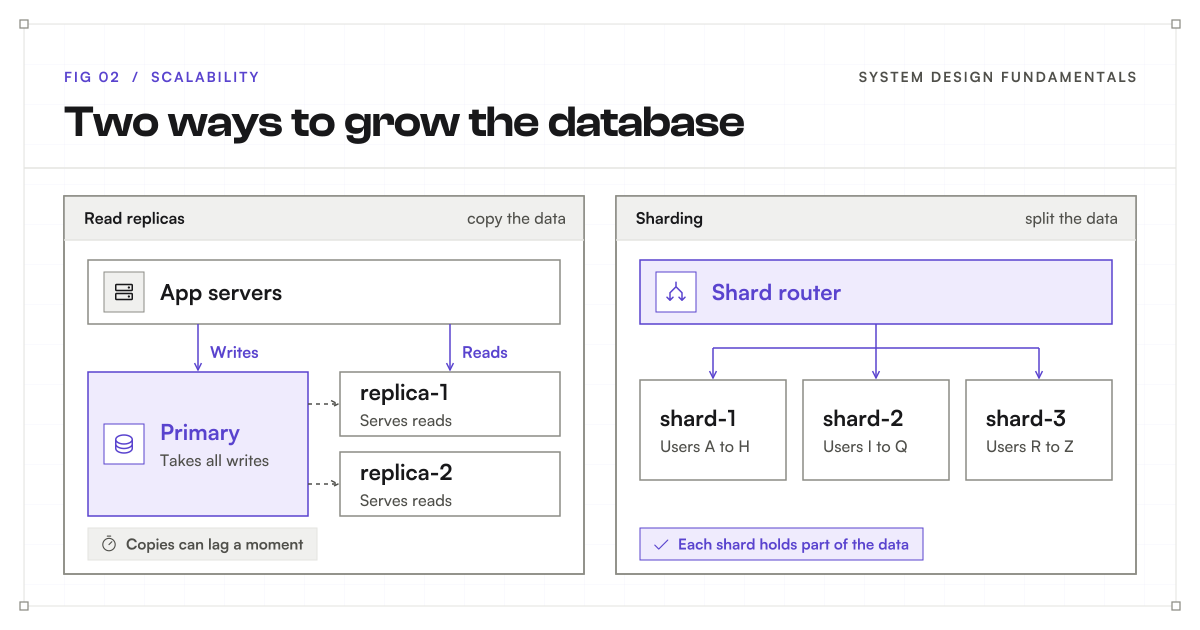
Adding app servers is the easy part. Sooner or later they all lean on one database, and it becomes the bottleneck. A database stores the application’s organized data. There are two main ways to grow it:
- Read replicas are copies of the database that answer read requests. All writes still go to one main database, called the primary, which copies each change to the replicas. This works well because most apps read far more than they write. The catch is replication lag: a replica can be a moment behind the primary.
- Sharding splits the data itself across several databases. For example, users A to H live on one shard, I to Q on another, and R to Z on a third. Each shard handles only part of the load, including writes. The catch is complexity: queries that span shards are harder, and an uneven split can overload one shard, called a hot spot.
Start with replicas. Shard only when writes or data size outgrow a single primary.
Trade-offs
- More servers bring more capacity, but also more to deploy, watch, and pay for.
- Read replicas add read capacity but can return slightly old data.
- Sharding scales writes but makes queries and operations harder.
- Building for huge scale too early wastes time. A common rule of thumb is to design for about ten times your current load, then revisit.
Simple example
A ticket site runs on two servers most days. When a big concert goes on sale, it adds eight more servers behind its load balancer, then removes them once the rush ends. Adding servers like this is horizontal scaling, like opening more branches. Upgrading the two existing servers would be vertical scaling, like buying a bigger oven.
Key terms
- Vertical scaling: making one server more powerful.
- Horizontal scaling: adding more servers that share the work.
- Load balancer: spreads incoming requests across servers.
- Autoscaling: adding or removing servers automatically as traffic changes.
- Stateless server: keeps no user information locally between requests.
- Sticky session: sends a user’s requests to the same server every time.
- Read replica: a database copy that serves reads.
- Sharding: splitting data across several databases.
Performance
What it is
Performance is how fast your system feels and how much work it gets done. It has two sides: how long one person waits for an answer, and how many people the system can serve each second.
A system can be quick for one user and slow for a thousand. So performance always means speed under the load you actually expect.
In the bakery: Performance is how long you stand at the counter before your croissant arrives, and how many customers the bakery serves each hour. One slow step, like a single overworked cashier, holds up everyone behind it.
Why it matters
Users notice slow responses, even when every feature technically works. People abandon slow pages, give up on slow checkouts, and assume a slow app is a broken one.
Latency: how long one request takes
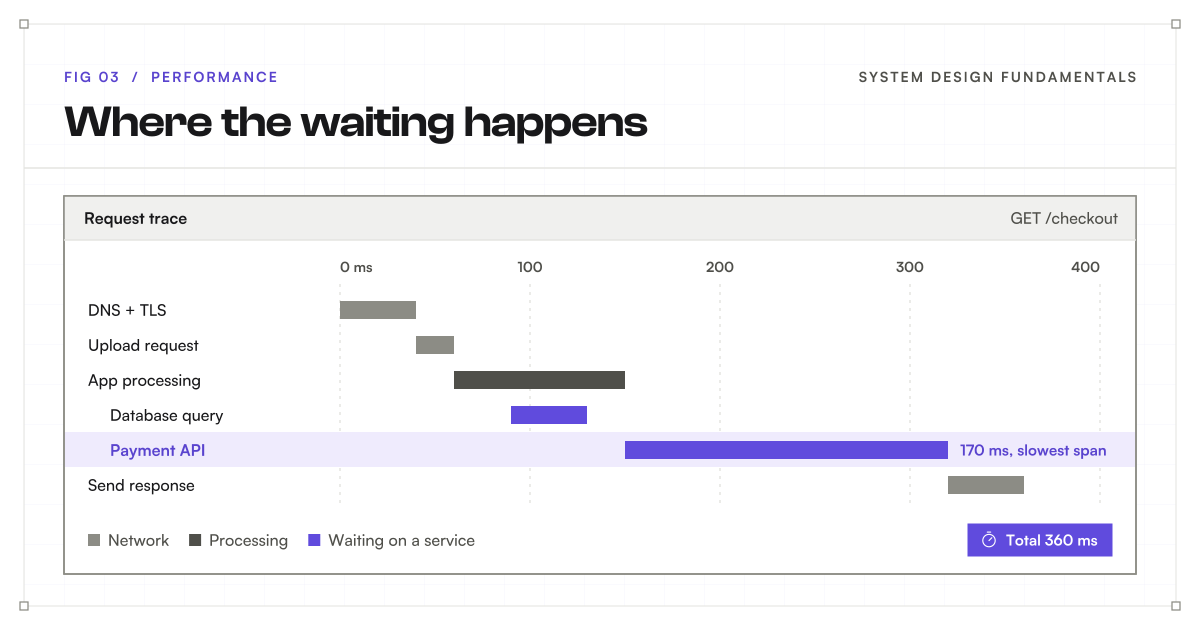
Latency means delay: the time between asking and getting an answer. It builds up from three sources:
- Network latency comes from moving data between machines. Distance matters. A request from Karachi to a in the United States must cross thousands of kilometres and come back.
- Processing latency comes from doing the work, such as running code or sorting results.
- Dependency latency comes from waiting on something else, such as a or a separate service your system calls.
Response time is the full wait, from sending a request to receiving its response. Round-trip time, or RTT, measures only one network trip there and back. A single response often includes several round trips plus all the work in between.
Throughput: how much work gets done
Throughput is how many requests the system completes per second. Latency is about one customer; throughput is about the whole queue.
Bandwidth is something else: how much data a connection can carry per second. More bandwidth helps large downloads, but it does not make a small request travel any faster.
Latency and throughput are linked. As a system gets close to full capacity, requests start waiting in line, and latency jumps sharply. A server that is 90% busy is often far slower than one at 60%.
In the bakery: Latency is how long one customer waits. Throughput is how many customers leave with bread each hour. A wider door (bandwidth) does not help if the oven is slow.
Measure with percentiles, not averages
An average is easily skewed by outliers, the rare values far away from the rest. Suppose 99 requests take 10 milliseconds and one takes 1 second. The average is (99 × 10 + 1,000) ÷ 100, or about 20 milliseconds. That is twice what 99 people actually experienced, yet it still hides the one person who waited a full second. The average describes no real request at all.
Percentiles avoid this. Instead of blending every value together, you sort the response times from fastest to slowest and read the value at a position in that list. In the same example, the p50, or median, is 10 milliseconds, which is exactly what a typical user saw. The slow request cannot drag it around. It appears on its own at the slow end of the list, called the tail.
Teams usually watch a few percentiles together:
- p50: the typical experience. Half of requests were faster, half were slower.
- p95: 95% of requests finished within this time. The slowest 5% took longer.
- p99: 99% finished within this time. It shows how bad things get for the unluckiest users. At high traffic, that 1% can still be thousands of people.
Load testing sends simulated traffic to find where the system slows down. Monitoring tracks the real system while it runs. Watch errors and throughput alongside response times, as Google’s monitoring guide explains.
Caching: keep answers close
A cache stores results that are expensive to produce, so the next request can reuse them. It is one of the most powerful performance tools you have.
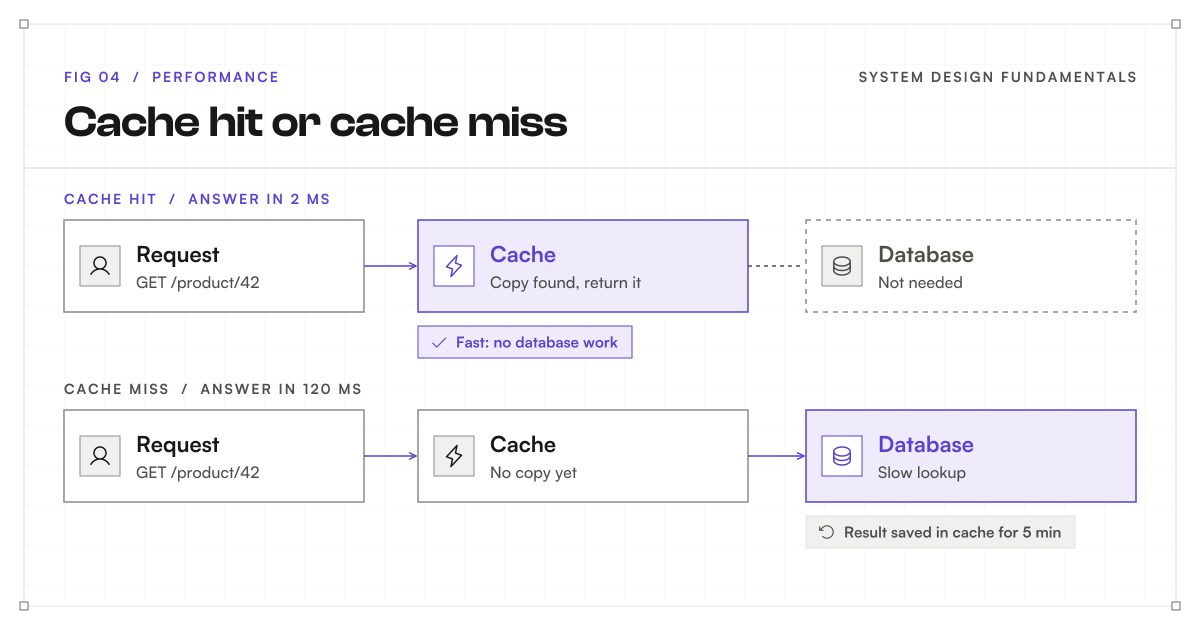
- A cache hit means the answer was already stored. The response is fast.
- A cache miss means it was not. The system does the slow work, returns the answer, and saves it for next time.
Caches live at many layers: in the user’s browser, on a CDN (a content delivery network, which keeps copies of files on servers close to users around the world), in a shared in-memory store like , or inside the database.
The hard part is freshness. Cached data goes stale when the original changes. A TTL, or time to live, sets how long an entry is kept before it expires. Short TTLs keep data fresher; long TTLs save more work.
Other ways to speed things up
- Fix the slowest part first. Find it with a , not a guess. Making a fast step faster changes little.
- Add database indexes. An index works like the index at the back of a book. The database finds rows without reading every one.
- Make fewer calls. Combine requests, and run independent calls at the same time instead of one after another.
- Send less data. Compress responses and return only the fields the screen needs.
- Move slow work to the background. Sending a receipt email does not need to finish before the user sees “Order placed.” A queue holds that job until a background worker picks it up.
Measure before and after each change.
Trade-offs
- Caching makes reads fast but can serve stale data, and it is one more system to manage.
- Background jobs make the app feel faster, but the work is not finished when the user sees success.
- Fewer, larger responses cut round trips but may send data the screen does not use.
- Shaving off the last few milliseconds often costs more engineering time than it is worth.
Simple example
A checkout page takes 360 milliseconds to respond. A trace shows that most of that time is spent waiting on the payment service. Shrinking the page helps a little, but speeding up the payment call helps most.
Key terms
- Latency: the delay before a response arrives.
- Throughput: completed requests per second.
- Bandwidth: how much data a connection can carry per second.
- Response time: the full wait from request to response.
- Percentile (p95, p99): the time within which that share of requests finished.
- Cache hit and miss: whether a stored answer was found.
- CDN: servers around the world that keep copies of files near users.
- TTL: how long a cached entry is kept before it expires.
Reliability
What it is
Reliability means the system does the right thing, every time, even when parts of it break. An order placed is an order saved. A payment is charged once, not twice and not zero times.
Thanks to Murphy’s law, something will fail eventually. A reliable system expects that and recovers without losing work or giving wrong results.
In the bakery: A reliable bakery gets every order right. If the main oven breaks mid-morning, a backup oven takes over, and no birthday cake gets lost or baked twice.
Why it matters
Users need to trust that an action will complete correctly, even when a component fails. A lost order or a double charge damages trust far more than a slow page.
Faults are not failures
A fault is one part going wrong: a crashed , a dropped network message, a full disk. A failure is when users feel it, because the service as a whole stops doing its job.
You cannot prevent every fault. Murphy’s law guarantees some. Reliability is the craft of stopping faults from becoming failures. A system that does this well is called fault tolerant.
Redundancy and failover
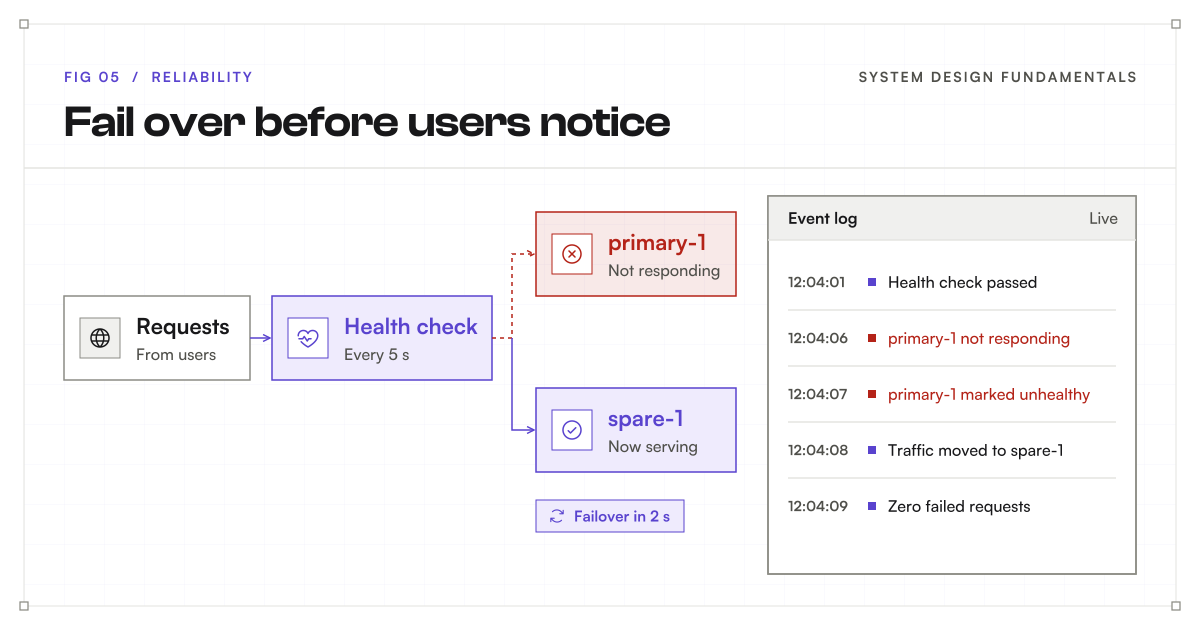
Redundancy means keeping spare copies of important parts. Failover means switching work to a healthy copy when the main one fails.
- In an active-passive setup, a spare waits on standby and takes over when the main copy fails. It is simple, but the spare sits idle most of the time.
- In an active-active setup, every copy serves traffic all the time. If one fails, the others absorb its share. This uses resources better but needs more coordination.
Spares only help if they do not share the same weakness. Two servers on the same power supply, in the same building, can fail together. Any part whose loss takes down everything is a single point of failure.
Health checks test whether a component can actually serve requests, not just whether it is switched on. They tell the which copies to trust.
Timeouts and retries
When a call to another service hangs, your system should not wait forever. A timeout sets the longest it will wait. After that, it gives up and handles the error.
Many faults are brief, so trying again often works. But careless retries can make things worse. If a struggling service receives every request three times, it now has three times the load.
Good retries follow three rules:
- Back off. Wait longer after each attempt, such as 1 second, then 2, then 4. This is called exponential backoff.
- Add jitter. Jitter is a small random delay, so thousands of clients do not all retry at the same moment.
- Set a limit. Stop after a few attempts and report the error.
AWS’s retry guide explains why uncontrolled retries can worsen failures.
Idempotency: make retries safe
Retries hide a danger. If a payment request times out, did the payment go through? Retrying might charge the customer twice.
Idempotency means doing an action twice has the same effect as doing it once. The client attaches an idempotency key, a unique label for the request. If the server sees the same key again, it returns the original result instead of repeating the action.
Reading data is naturally idempotent. Setting a value, such as “set quantity to 3,” is idempotent too. Changing a value, such as “add 1 to quantity,” is not, unless a key protects it.
Circuit breakers: stop calling a broken service
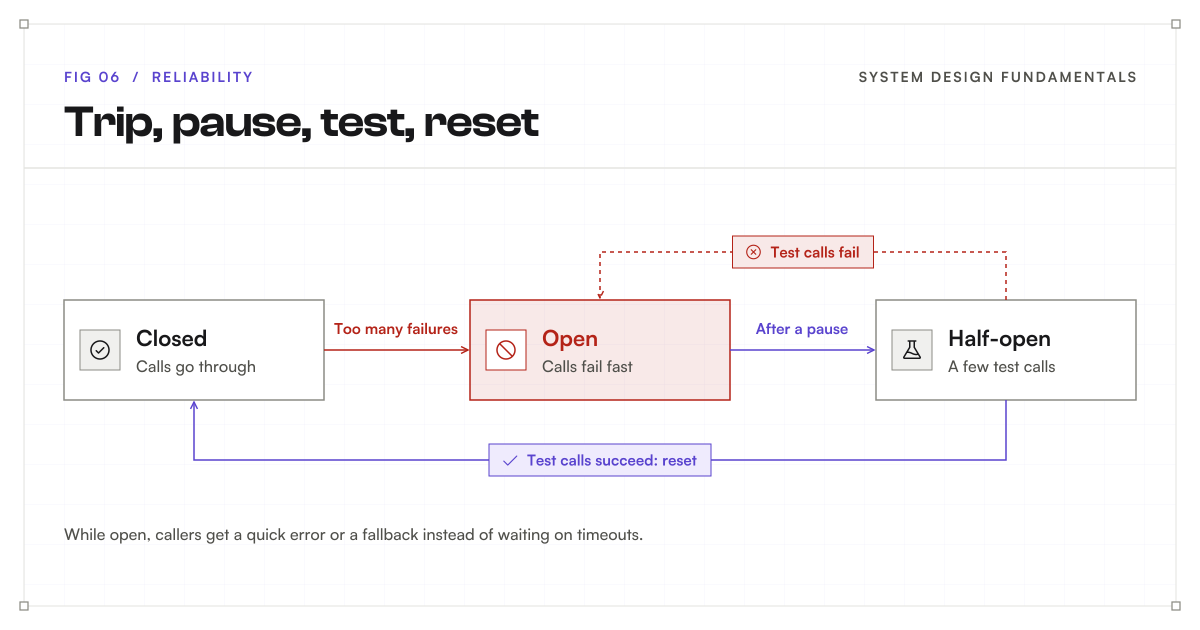
A circuit breaker watches calls to another service. If too many fail, it “opens” and stops sending calls for a while. Callers get a quick error or a fallback instead of waiting on timeouts. After a pause, it lets a few test calls through. If they succeed, normal traffic resumes. If they fail, it opens again.
It works like the circuit breaker in a house: it trips to prevent damage, and it is reset once the problem is fixed.
Graceful degradation
When something optional breaks, keep the essential parts working. If a shop’s recommendation service goes down, the shop can still show products and take orders, just without “You might also like.” Users get a slightly worse experience instead of an error page.
In the bakery: If the espresso machine breaks, the bakery keeps selling bread and puts up a sign. It does not close the whole shop.
Trade-offs
- Redundancy means paying for spare capacity that is mostly idle.
- Retries recover from brief faults but can overload a service that is already struggling.
- Circuit breakers protect the system, but some users get a fallback instead of the real answer.
- Every safety mechanism is more code that can have bugs of its own. Test failure paths on purpose.
Simple example
A payment application loses the reply after recording a payment. It retries with the same idempotency key, so the customer gets one payment recorded instead of two.
Key terms
- Fault: one part going wrong. Failure: users feeling it.
- Redundancy: keeping spare copies of important parts.
- Failover: switching work to a healthy copy.
- Single point of failure: a part whose loss takes down everything.
- Timeout: the longest a caller will wait for an answer.
- Exponential backoff and jitter: growing, slightly random waits between retries.
- Idempotency key: a unique label that lets the server spot repeated requests.
- Circuit breaker: stops calls to a failing service until it recovers.
- Graceful degradation: keeping core features working when optional ones fail.
Availability
What it is
Availability means the system is up and usable when people try to use it. It is usually measured as a percentage of time, such as 99.9%.
Reliability asks, “Does it work correctly?” Availability asks, “Can I use it right now?” A system can be correct but down, or up but giving wrong answers.
In the bakery: Availability is whether the doors are open when customers arrive. A bakery with perfect bread that is closed half the hours it promised has poor availability.
Why it matters
Even a well-built application cannot help users while it is down. For many businesses, every minute offline means lost sales, missed messages, or broken trust.
Measuring availability
Uptime is the time a service is usable. The simplest measure is uptime divided by total time, multiplied by 100.
Define “usable” first. A that is switched on but returning errors is not available. Check from the user’s point of view, by making real requests the way a user would.
For partial outages, time alone can mislead. If 10% of requests fail for an hour, the service was neither fully up nor fully down. Many teams also measure request-based availability: successful requests divided by valid requests.
The nines
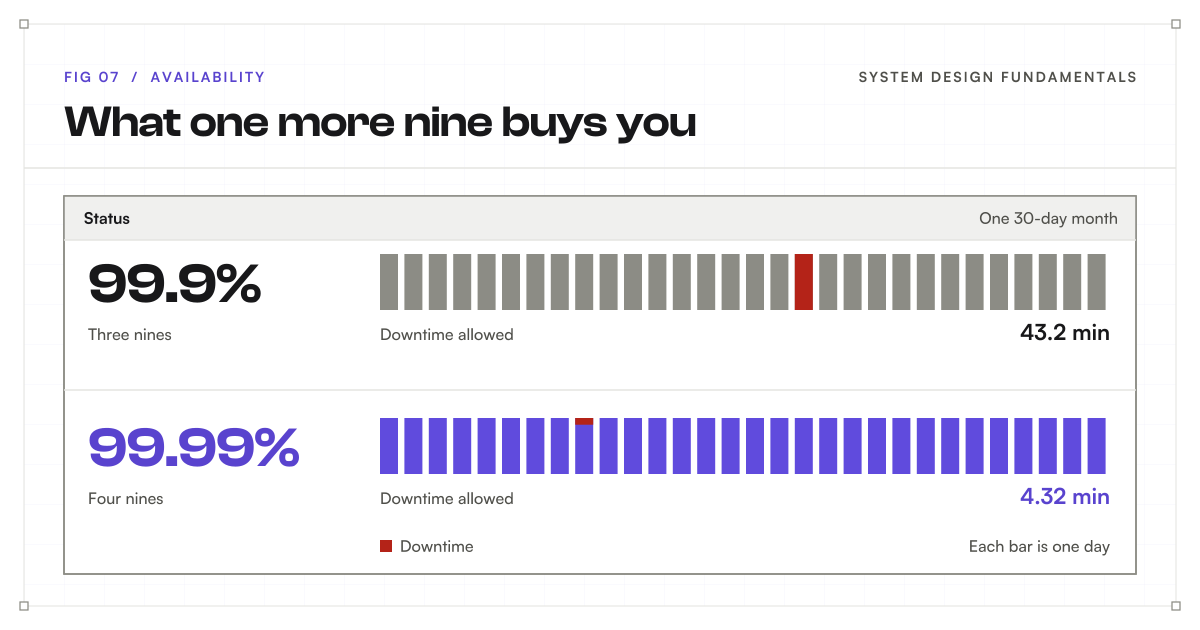
Availability is often described in “nines.” These figures assume every minute counts.
| Availability | Name | Downtime per 30-day month | Downtime per year |
|---|---|---|---|
| 99% | Two nines | 7.2 hours | 3.65 days |
| 99.9% | Three nines | 43.2 minutes | 8.76 hours |
| 99.99% | Four nines | 4.32 minutes | 52.6 minutes |
| 99.999% | Five nines | About 26 seconds | 5.26 minutes |
Each extra nine cuts the allowed downtime by ten, and it usually costs much more to reach. At five nines, there is no time for a person to even notice a problem, let alone fix it. Recovery has to be automatic.
More parts in a chain, more ways to fail
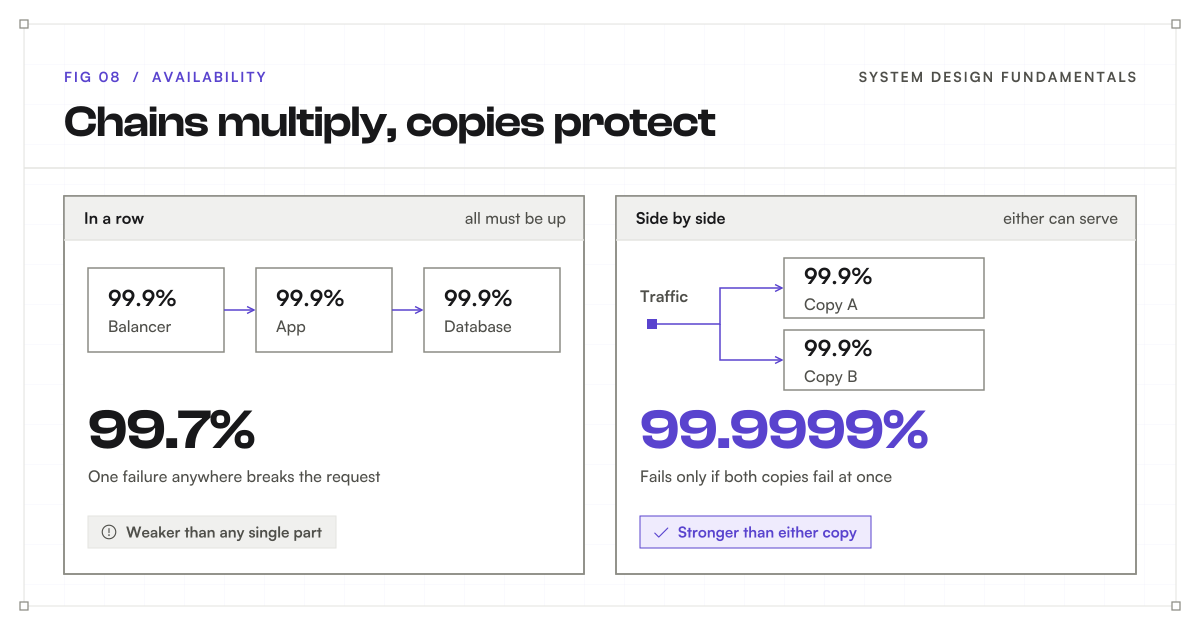
A dependency is any part your system needs in order to answer a request. A request often passes through several dependencies in a row: a , then an app server, then a . If any one of them is down, the whole request fails. So to find the availability of the whole chain, you multiply the availability of each part.
Three parts in a row, each at 99.9%, give 99.9% × 99.9% × 99.9%, or about 99.7%. The chain is weaker than any single link.
works the other way. Two copies side by side, each 99.9% available, fail only if both are down at the same time. The chance of that is 0.1% × 0.1%, or 0.0001%, which gives about 99.9999%. This assumes the copies fail independently, which is why they must not share a .
This is why highly available systems run copies in separate availability zones, which are separate data centers within one , and sometimes in separate regions.
Fail less, recover faster
Two numbers describe how availability is earned:
- MTBF, mean time between failures, is the average time a system runs before something breaks. Higher is better.
- MTTR, mean time to restore, is the average time it takes to recover. Lower is better.
You improve availability by failing less often or by recovering faster. Recovering faster is often the easier win: automatic , quick of bad releases, and alerts that reach the right person.
Many outages are caused by changes, not hardware. Releasing to a small share of users first catches a bad change before it reaches everyone. This is called a canary release.
SLIs, SLOs, and SLAs
- An SLI, or service level indicator, is what you measure, such as the share of successful requests.
- An SLO, or service level objective, is your internal target, such as 99.9% successful requests over 30 days.
- An SLA, or service-level agreement, is a promise to customers with consequences, such as refunds, if you miss it. Its measurement window, exclusions, and definition of failure all matter.
Teams usually set the SLO stricter than the SLA, so they get a warning before they break a promise. Google’s service-level guide explains how these fit together.
Trade-offs
- Each extra nine costs far more than the last: more regions, more automation, more people on call.
- Staying available during a network split can mean serving older data. The Consistency section explains why.
- Freezing all changes improves availability but stops progress. Teams balance the two with an error budget: the downtime the SLO allows, spent on shipping new work.
- Not every feature needs the same target. Checkout may need four nines; changing a profile picture may not.
Simple example
A delivery app is unusable for 20 minutes in a 30-day month. With all minutes counted, its time-based availability is about 99.954%, meeting three nines but missing four.
Key terms
- Uptime: time the service is usable.
- The nines: shorthand for availability levels, such as 99.9%.
- Availability zone: a separate data center within one cloud region.
- MTBF: average time between failures.
- MTTR: average time to restore service.
- Canary release: releasing a change to a small group first.
- SLI, SLO, SLA: what you measure, what you aim for, and what you promise.
- Error budget: the downtime your target allows.
Consistency
What it is
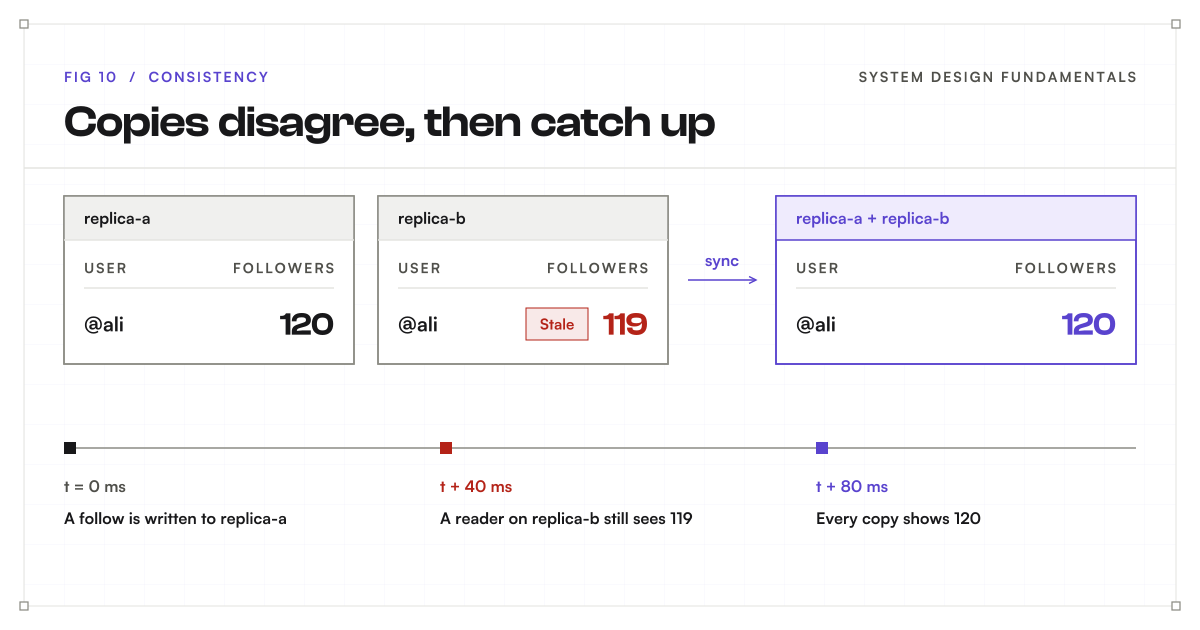
Consistency is about whether everyone sees the same data at the same time. Large systems keep several copies of their data on different machines. When something changes, those copies need a moment to catch up.
Consistency defines what a user may see during that gap: always the newest value, or possibly a slightly older one for a short while.
In the bakery: Each branch has a menu board. When the price of bread changes, someone must update every board. Until they do, one branch shows the old price and another shows the new one. means no branch sells bread until every board matches. means the boards catch up within a few minutes.
Why it matters
Different copies can briefly disagree, and some decisions cannot safely use old data. Showing a slightly old like count is harmless. Selling the same concert seat to two people is not.
Why copies exist at all
Systems keep copies of data for good reasons: to survive a machine failure, to serve more reads, and to sit closer to users in different parts of the world. But copying takes time. The moment data changes in one place, there is a gap before every other copy hears about it. Consistency is about how a system handles that gap.
Strong consistency
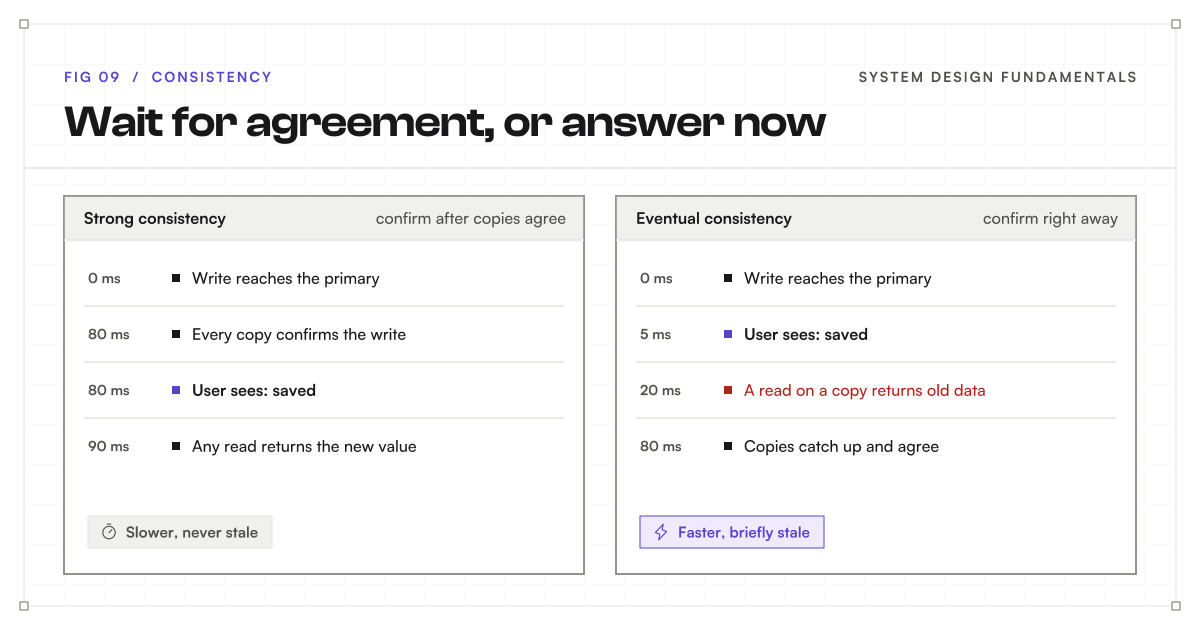
Strong consistency means every read returns the latest completed write. Once you see “Saved,” every user, everywhere, sees the new value.
How it works. The system does not confirm a write until enough copies have it. Readers are then guaranteed to see it.
Strengths. It is easy to reason about. The system behaves as if there were only one copy.
Costs. Writes wait for copies to agree, which adds , especially across distant . If copies cannot reach each other, the system may have to refuse requests rather than risk returning wrong data.
Use it for money, stock levels, bookings, passwords, and anything where acting on old data causes real harm.
Eventual consistency
Eventual consistency lets copies disagree for a short time. The system confirms a write right away and spreads it to other copies in the background. If updates stop and communication resumes, the copies eventually agree. It does not promise a fixed waiting time by itself.
Strengths. Reads and writes are fast, and the system keeps working even when copies cannot talk to each other.
Costs. Users may briefly see old data. Two people editing at once can create conflicts the system must resolve.
Use it for like counts, view counts, social feeds, reviews, and analytics, where being a moment behind is fine.
A middle ground: read-your-writes
Between the two sits a useful compromise. Read-your-writes consistency guarantees that you always see your own changes, even if other people see them a moment later. If you rename your profile, you will never refresh and see the old name, even though a friend in another country might, for a second. Many apps use this because it removes the most confusing kind of staleness.
The CAP theorem
CAP stands for consistency, availability, and tolerance. A network partition means some cannot communicate with others. Partition tolerance means handling that communication failure. In a , which runs across multiple connected computers, partitions will happen eventually.
During a partition, the CAP theorem says a distributed data system cannot guarantee both strong consistency and a successful response to every request. It must lean one way:
- Stay consistent: refuse some requests rather than risk returning old or conflicting data.
- Stay available: answer every request, accepting that some answers may be out of date.
CAP is about guarantees during partitions, not a permanent choice of any two features. When the network is healthy, a system can be both consistent and available. IBM’s CAP explanation covers this trade-off.
A related idea, called PACELC, adds the everyday case: even with no partition, you trade latency against consistency, because waiting for copies to agree always takes time.
In the bakery: The phone line between two branches goes down, and a customer asks for the last cake. A branch can refuse until the line is back (consistent), or sell it and risk the other branch selling the same cake (available).
Choose per action, not per system
Most applications mix both. A shop can use strong consistency for payments and stock, and eventual consistency for reviews and recommendations. For each action, ask: what is the worst thing that happens if this read is a few seconds old?
Trade-offs
- Strong consistency costs latency and, during network problems, some availability.
- Eventual consistency costs simplicity: the app must handle old data and conflicts.
- Strict guarantees across distant regions cost the most, because every agreement must cross that distance.
Simple example
A social app’s follower count may briefly differ between two phones. Eventual consistency lets the count catch up without making every profile view wait for all copies.
Key terms
- Replica: a copy of the data on another machine.
- Replication lag: how far a copy is behind the original.
- Strong consistency: every read returns the latest completed write.
- Eventual consistency: copies may briefly disagree, then catch up.
- Read-your-writes: you always see your own changes immediately.
- Network partition: servers that cannot reach each other.
- CAP theorem: during a partition, choose between consistency and answering every request.
Maintainability
What it is
Maintainability is how easy it is for people to understand, fix, and change the system. Software is never finished. New features, bug fixes, and new teammates keep arriving.
A maintainable system lets someone make a change quickly and confidently, without breaking something unrelated.
In the bakery: A maintainable bakery has labeled shelves, written recipes, and a clear kitchen layout. A new baker can find the flour and follow a recipe on day one. In a messy kitchen, only the owner knows where anything is, and every change is a gamble.
Why it matters
Software keeps changing, and confusing systems make each change slower and riskier. Over a product’s life, most engineering time goes into changing existing code, not writing new code. A system that is hard to change gets slower to improve every month.
Keep it simple
Complexity is the main enemy. Some complexity is essential: it comes from the problem itself, like tax rules. The rest is accidental: it comes from our own choices, like clever code, extra tools, or services nobody needs yet.
Remove accidental complexity wherever you can. Clean code uses clear names, small functions, and straightforward logic. Explain surprising choices in a comment or a short design note, so the next person understands the reason, not just the code.
Modularity
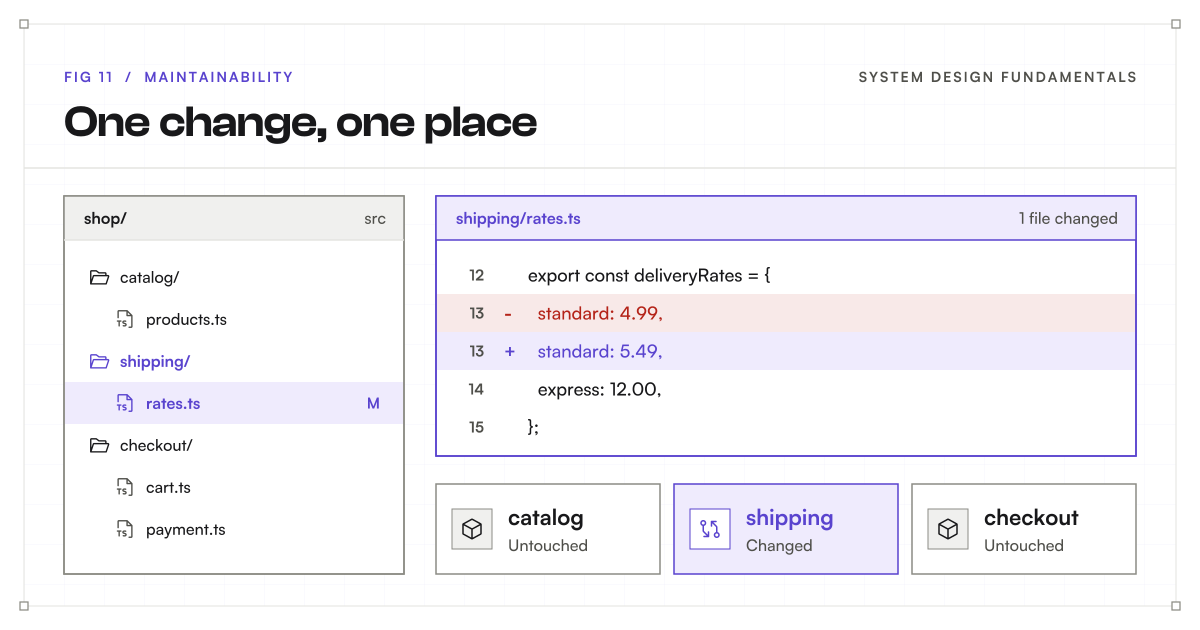
Modularity means splitting the system into parts with clear jobs and clear boundaries. Each hides its details behind a small, well-defined interface. Other parts use that interface and do not reach inside.
Two ideas describe good boundaries:
- High cohesion: things that change together live together. All shipping rules sit in the shipping module.
- Loose coupling: modules depend on each other as little as possible. Changing shipping does not break checkout.
Monolith or microservices?
A monolith is one application deployed as a single unit. Microservices split the system into many small services that are deployed separately and talk to each other over the network.
| Monolith | Microservices | |
|---|---|---|
| Getting started | Simple | Slower |
| Deploying | One unit, all at once | Each service on its own |
| Scaling | The whole app together | Each part separately |
| Failures | One bug can affect everything | Can be isolated, if designed well |
| Running it | One thing to operate | Many services, networks, and dashboards |
Microservices help large teams work independently, but they turn simple function calls into network calls that can fail. Many successful systems start as a modular monolith, one deployable app with strong internal boundaries, and split out services only where needed. Separate modules do not have to mean separate .
Observability
Observability means understanding what a system is doing from the outside, using what it records. It rests on three kinds of signals:
- Logs record individual events, such as “Payment 482 failed: card declined.”
- Metrics track numbers over time, such as requests per second, error rate, and memory use.
- Traces follow one request across every service it touches and show where the time went.
Together, they answer “What is broken, where, and why?” without guessing. Alerts built on metrics can warn you before users start complaining.
Testing and safe changes
Automated tests check behavior before changes reach users.
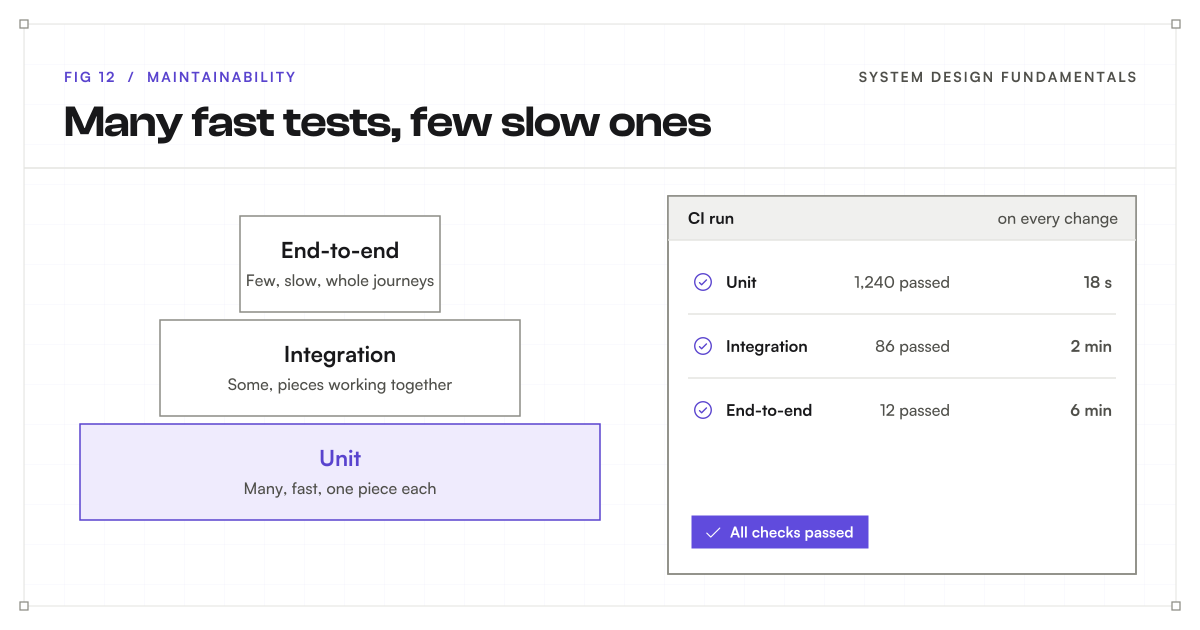
- Unit tests check small pieces, such as one function. They are fast, so you can have many.
- Integration tests check that pieces work together, such as your code and a real .
- End-to-end tests check complete user journeys in a real browser. They are slow and fragile, so keep them few and focused on what matters most.
This shape, with many fast tests at the bottom and a few slow ones at the top, is called the testing pyramid.
Continuous integration, or CI, runs the tests automatically on every change. Combined with small, frequent releases, it keeps each change low-risk and easy to undo.
Technical debt
Technical debt is future work created by shortcuts or outdated choices. Like money debt, it can be useful: shipping quickly to learn from users is often the right call. But it charges interest. Every later change in that area takes longer.
Record debt when you take it on, explain its cost, and pay down the parts that repeatedly slow the team.
In the bakery: Skipping the cleanup during one rush is fine. Skip it every day, and soon nobody can find anything and every order takes twice as long.
Trade-offs
- Clean structure takes more time up front but saves time on every later change.
- Microservices give teams independence but add network failures and operational work.
- More tests catch more bugs but take time to write, run, and maintain.
- Some debt is worth taking on to ship sooner, as long as you track it.
Simple example
An online shop keeps shipping rules in one clear module. When delivery prices change, a developer updates that module and runs its tests instead of searching through the whole application.
Key terms
- Modularity: splitting a system into parts with clear jobs and boundaries.
- Cohesion and coupling: how closely related a module’s contents are, and how much modules depend on each other.
- Monolith: one application deployed as a single unit.
- Microservices: many small services deployed separately.
- Observability: understanding a system through its logs, metrics, and traces.
- Testing pyramid: many unit tests, some integration tests, few end-to-end tests.
- CI: running tests automatically on every change.
- Technical debt: future work created by shortcuts.
Security
What it is
Security means keeping data and actions safe from people who should not have them. It covers who can get in, what they can do once inside, and how data is protected while stored or sent.
Security is not one feature added at the end. It shapes decisions everywhere, from the sign-in page to the .
In the bakery: Customers can walk through the front door, but only staff can enter the kitchen, and only the manager holds the key to the cash register. Checking who someone is happens at the door. Checking what they may touch happens at every room.
Why it matters
A fast, dependable application still fails its users if it exposes their information. One breach can leak private data, bring fines, and destroy trust that took years to build.
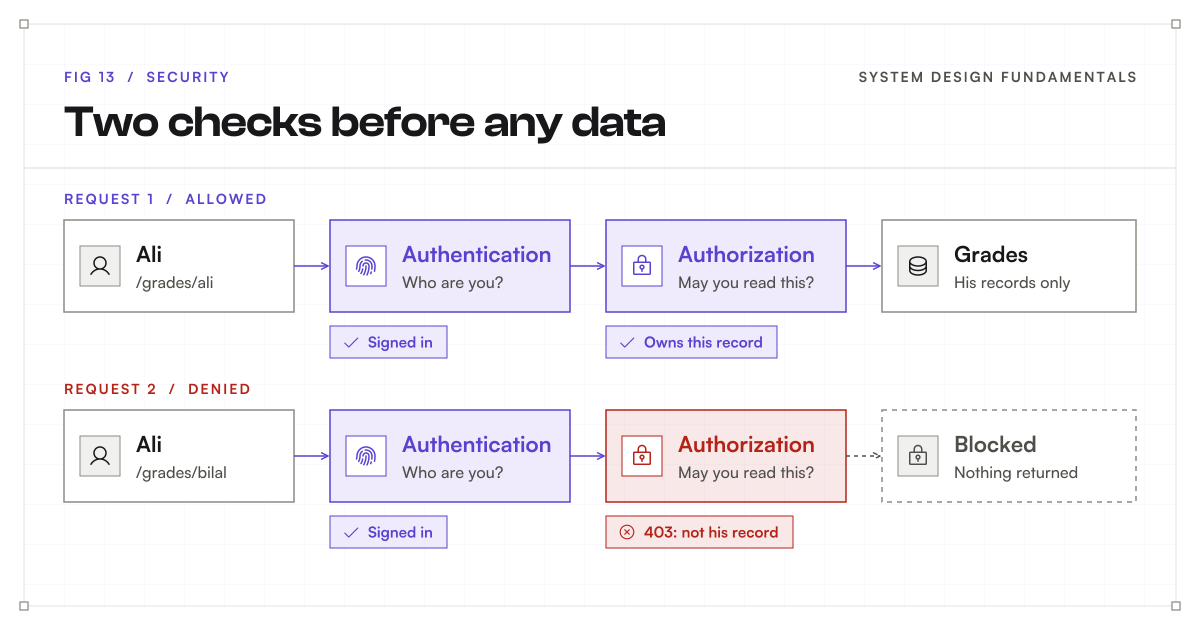
Authentication: who are you?
Authentication checks identity. Passwords are the most common method, but on their own they are weak. People reuse them, and they leak.
- Multi-factor authentication, or MFA, adds a second proof, such as a code from an app or a hardware key. A stolen password alone is no longer enough.
- After sign-in, the gives the browser a session or a token: a temporary pass that proves the user already signed in. These passes must expire, and they must be stored where scripts from other sites cannot read them.
- Many apps let a trusted provider handle sign-in, such as “Sign in with Google,” using a standard called OAuth. Then the app never stores a password at all.
Authorization: what may you do?
Authorization checks permissions. Signing in does not automatically grant access to every record.
- Role-based access control, or RBAC, gives permissions to roles, such as student, teacher, or admin, and then assigns roles to people.
- Check permissions on the server, for every protected action, every time. Hiding a button in the interface is not security, because anyone can send the request directly.
A common bug is checking that someone is signed in but not that the record belongs to them. Change an ID in the address bar, and you see someone else’s data. Check ownership on every protected request, as OWASP’s authorization guide recommends.
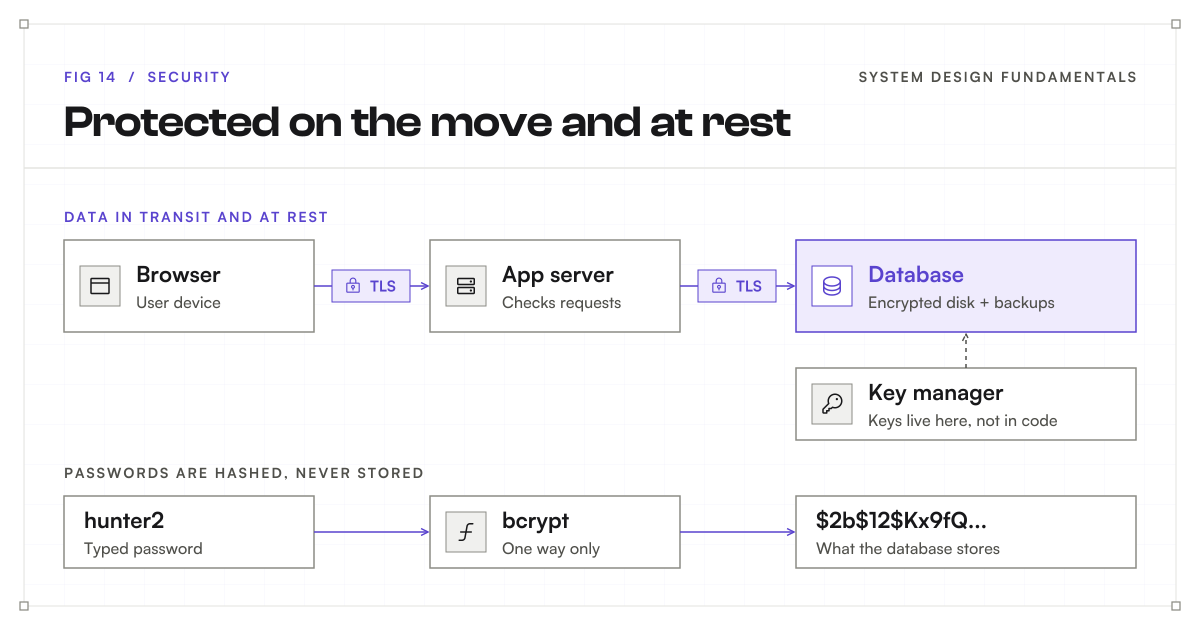
Encryption: in transit and at rest
Encryption scrambles data so that only someone with the right key can read it.
- In transit: data moving across a network is protected with TLS, the “S” in . Without it, anyone on the same Wi-Fi could read or change the traffic.
- At rest: data on disks and in backups is encrypted, so a stolen disk or leaked backup is useless without the key.
- Keys need protection too. Keep them in a dedicated key manager or secrets store, never in source code.
Passwords are a special case. They should never be stored, not even encrypted. Store a hash instead: a one-way fingerprint that can check a password without revealing it. Use slow password-hashing algorithms such as bcrypt or Argon2, which make guessing very expensive.
Never trust input
Anything from outside the system, including forms, addresses, headers, and uploaded files, could be harmful.
- Input validation checks types, lengths, and allowed values on the server.
- Parameterized queries keep database instructions separate from user-supplied values. This blocks SQL injection, where an attacker sneaks database commands into a form field.
- Output escaping stops user content from running as code in other people’s browsers, an attack called cross-site scripting, or XSS.
Limit the damage
Assume something will eventually get through. Murphy’s law applies to security too.
- Least privilege gives each person and service only the access it needs. A reporting tool that only reads data should not be able to delete it.
- Rate limiting caps how many requests someone can make in a period. It slows password guessing and protects capacity. Set limits carefully so normal users can still finish their tasks.
- Defense in depth means stacking several layers of protection, so one failure does not become a breach.
- Audit logs record who did what and when, so you can investigate. Keep secrets and personal data out of logs.
- Keep dependencies updated. Much of an app’s code comes from third-party libraries, and known holes in them are a common way in.
In the bakery: The bakery locks the till, gives the cleaner a key to the front door but not the safe, and still installs a camera, just in case.
Trade-offs
- More checks mean more friction. MFA is safer but adds a step at sign-in.
- Encryption and hashing cost some processing time, though usually very little.
- Strict rate limits stop abuse but can block real users during a busy moment.
- Security work rarely looks like a feature, but skipping it is far more expensive later.
Simple example
In a school portal, signing in proves a student’s identity. Permission checks let that student read their own grades while blocking access to another student’s records.
Key terms
- Authentication: checking who someone is.
- Authorization: checking what they may do.
- MFA: a second proof of identity beyond a password.
- RBAC: permissions granted through roles.
- TLS: encryption for data moving across a network.
- Encryption at rest: encryption for stored data and backups.
- Hashing: a one-way fingerprint used to store passwords.
- SQL injection and XSS: attacks that sneak code in through user input.
- Least privilege: only the access each person or service needs.
- Rate limiting: capping requests per period.
The seven pillars at a glance
| Pillar | Simple definition |
|---|---|
| Scalability | Handle growing demand by increasing capacity. |
| Performance | Respond quickly and complete enough work. |
| Reliability | Do the intended job correctly over time. |
| Availability | Be usable when people need the service. |
| Consistency | Define how reads reflect changes across data copies. |
| Maintainability | Make the system easy to understand and change. |
| Security | Protect data and actions from unauthorized access. |
Putting the pillars together
These pillars involve trade-offs. Coordinating every data copy can increase response time. Extra can improve resilience but add cost and maintenance. No system maximizes all seven pillars at once.
Start with what users need. Then explain which qualities matter most, what you would measure, and which compromises you accept. That is a strong foundation for both real projects and interviews.