Kafka shows up everywhere: in job posts, in system design interviews, and probably somewhere inside your own company’s stack. It is often described as a “distributed streaming platform,” which sounds impressive and explains very little.
This post explains how Kafka works and why it is built the way it is. You don’t need to know any tools already. We will use one picture the whole way through: a busy shop. Customers come in, cashiers take orders, and teams in the back prepare them. Every part of Kafka maps to something inside that shop, so keep it in mind.
A few ideas from System Design Fundamentals come back here, like scalability, reliability and consistency. You don’t need to read that post first, but it helps.
New to a term? Words with a dotted underline show a short definition when you hover over them or tap them.
The problem: everyone shouting at everyone
Imagine our shop has no system at all. A customer walks in and shouts their order straight at the cook. Another customer shouts at the packing team. Someone else shouts at the accounts person. Everyone talks to everyone.
It is loud and confusing. Worse, if the cook steps away for a minute, that order is simply lost. Nobody wrote it down.
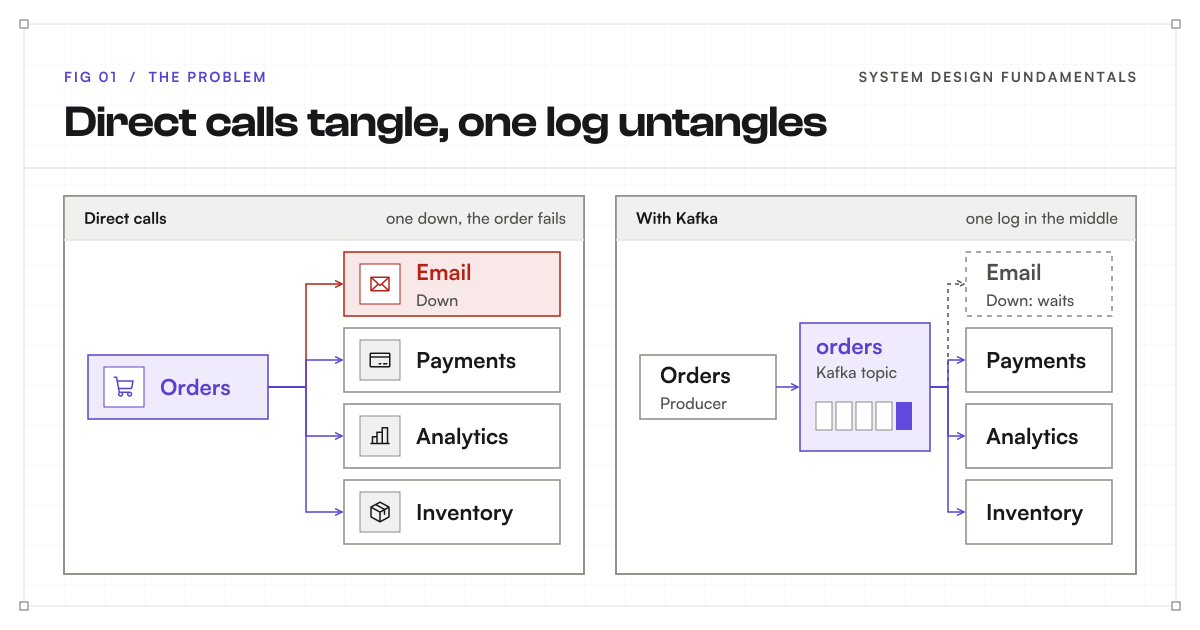
Software has the same problem. When a customer places an order, your order service might call the email service, the payment service, the analytics service, and the inventory service, one by one. This works when you have two services. It falls apart as you add more:
- Connections multiply. Every new service that cares about orders needs another direct call from the order service, and the order service has to know about all of them.
- One slow service slows everything. If the analytics service takes three seconds to answer, the customer waits three seconds to see “order placed.”
- One failure spreads. If the email service is down, the order service has to decide what to do: fail the whole order, , or quietly skip the email. Most of those choices are bad.
This tight coupling, where one service must wait for and know about every other service, is the problem Kafka solves.
The fix: one receipt roll
The shop fixes this in a very simple way. Customers no longer shout at the cooks. They go to a cashier, and the cashier writes every order on a long receipt roll. The teams in the back never talk to customers. They just read the receipt roll and do their work.
That receipt roll is the heart of Kafka. In Kafka, it is called a log.
The one rule: only add to the end
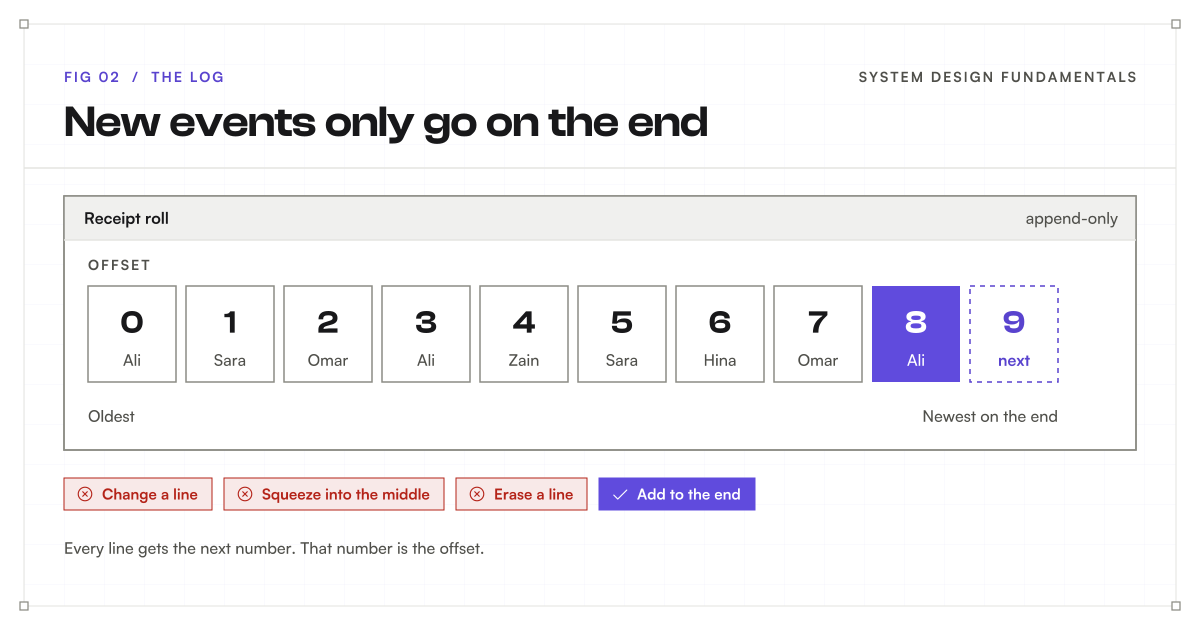
The receipt roll has one rule. You can only add to the end.
- You never erase an old order.
- You never change an old order.
- You never squeeze a new order into the middle.
New orders always go on the next line. This is called an append-only log. “Append” just means “add to the end.”
Every line gets a number
Every line on the roll gets a number. The first order is 0, the next is 1, then 2, then 3. In Kafka, this number is called the offset. The offset is simply the position of an in the log. Once a line has a number, that number never changes.
Offsets are what make the roll useful. Anyone reading it can say “I have finished everything up to line 42,” and everyone knows exactly what that means.
You have seen this idea before: the write-ahead log
If you have worked with , you have already met an append-only log, even if you never looked at it. Databases like PostgreSQL and MySQL keep a write-ahead log, or WAL.
Before the database changes any data, it first writes a note about that change at the end of the WAL. Only then does it update the actual tables. If the database crashes halfway through, it reads the WAL on restart and replays any changes that did not finish. Nothing that was confirmed gets lost.
So a WAL is an append-only log that a database uses on the side, to keep its data safe. Kafka takes the same idea and makes it the main thing. In Kafka, the log is not a safety net behind the data. The log is the data.
Key terms
- Log: a list you can only add to at the end.
- Append-only: new entries go on the end; old ones are never edited or moved.
- Offset: the position of an event in the log, starting at 0.
- Write-ahead log (WAL): the append-only log a database uses to recover after a crash.
What goes on each slip: events
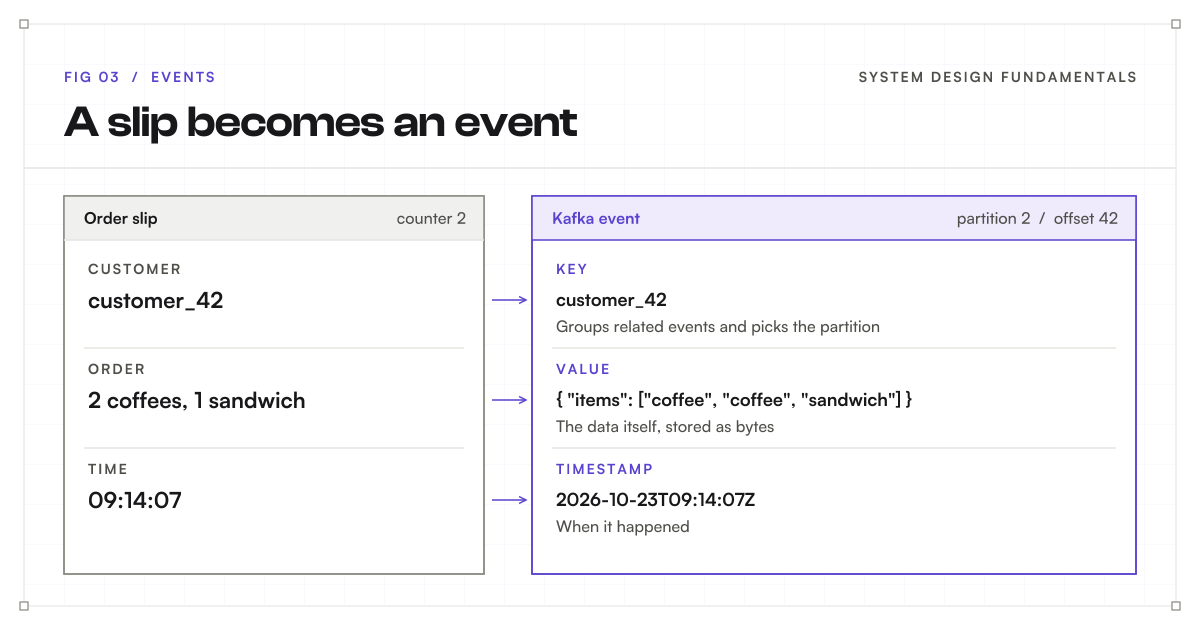
Now, what exactly is written on each line of the roll? Each order slip has a few parts:
- A key, such as the customer ID. It says who or what this slip is about.
- A value, which is the actual order, such as “two coffees and a sandwich.”
- A timestamp, the time the order was written.
In Kafka, each slip is called an event, also known as a record or a message. An event is just a small piece of data that says something happened. “Order placed.” “Payment received.” “User clicked the buy button.”
Kafka does not care what is inside the value. To Kafka, it is just bytes. Your applications decide the format, often JSON or a compact binary format such as Avro or Protobuf. Events can also carry optional headers, small labels such as a ID, but the key and value are the parts that matter most.
Notice that an event describes something that already happened. It is a fact, not a command. “Order 42 was placed” is an event. “Send an email for order 42” is a command. This difference matters: many teams can react to the same fact in their own way, which is exactly what we want.
Separate rolls for separate things: topics
Our shop does not only handle orders. It also handles refunds and deliveries. If everything goes on one roll, it gets messy fast: the kitchen has to skip past refunds, and the delivery team has to skip past orders.
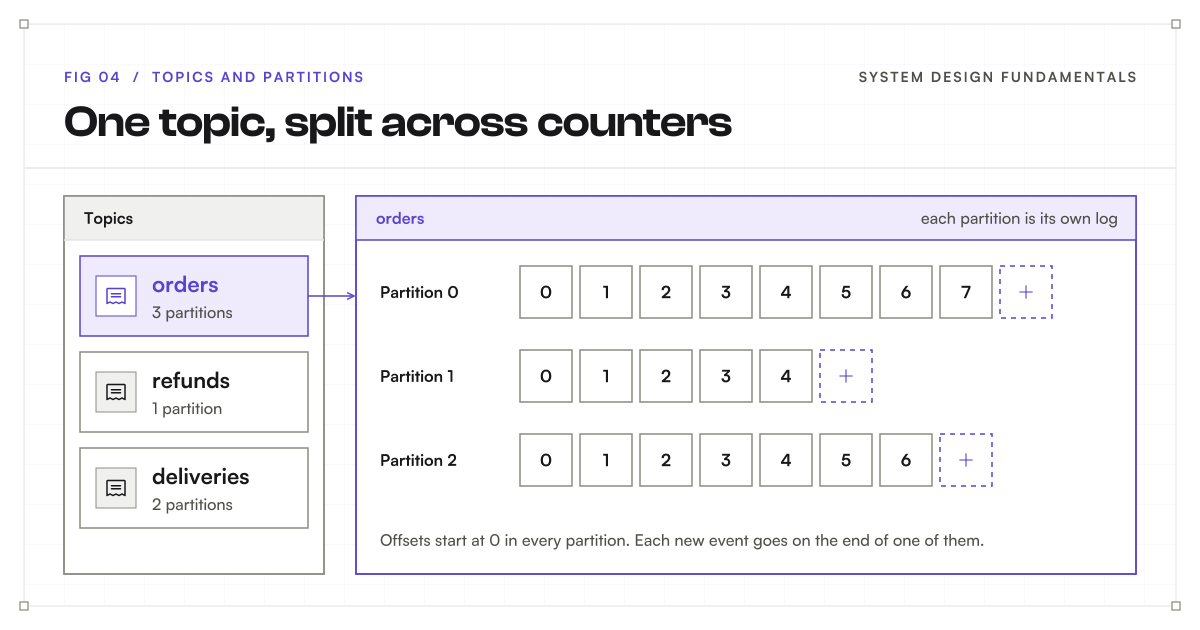
So the shop keeps separate rolls: one for orders, one for refunds, one for deliveries. In Kafka, each named roll is called a topic. A topic is a category of , such as an orders topic or a payments topic.
choose which topic to write to. choose which topics to read. A team that only cares about refunds never has to look at an order.
More counters: partitions
Now the shop gets really busy. Hundreds of customers are arriving, and one cashier with one roll cannot keep up. Everyone is stuck in one long line.
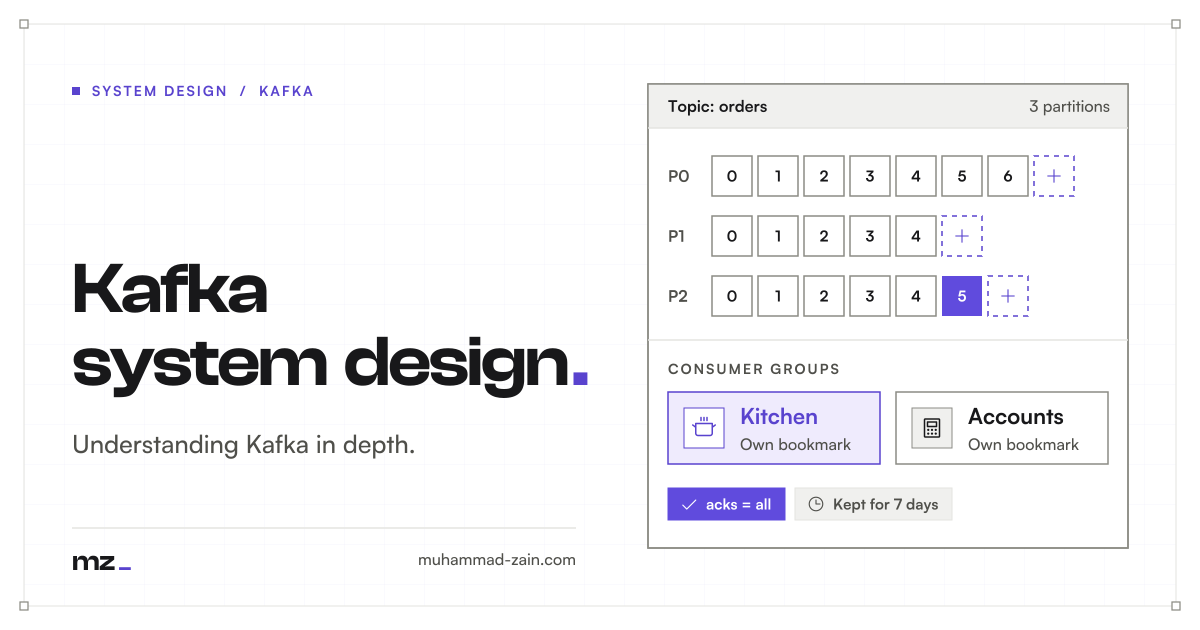
So the shop opens more counters. Instead of one orders roll, there are now three counters, and each counter has its own orders roll. Three cashiers can write at the same time, and three cooks can read at the same time.
In Kafka, these counters are called partitions. A is split into one or more partitions, and each partition is its own with its own . Partition 0 has offsets 0, 1, 2, and so on. Partition 1 has its own offsets 0, 1, 2, and so on.
This is how Kafka scales. One partition can only go so fast, because it is one log on one machine. More partitions means more work can happen at the same time, on more machines. You may recognize this from the fundamentals post: it is horizontal scaling, and splitting data by key is the same idea as a .
Which counter? Keys and hashing
Partitions create a new question. If Ali comes back for a second order, which counter should Ali go to?
The shop’s rule is: the same customer always goes to the same counter. That way, all of Ali’s orders end up on one roll, in the right order.
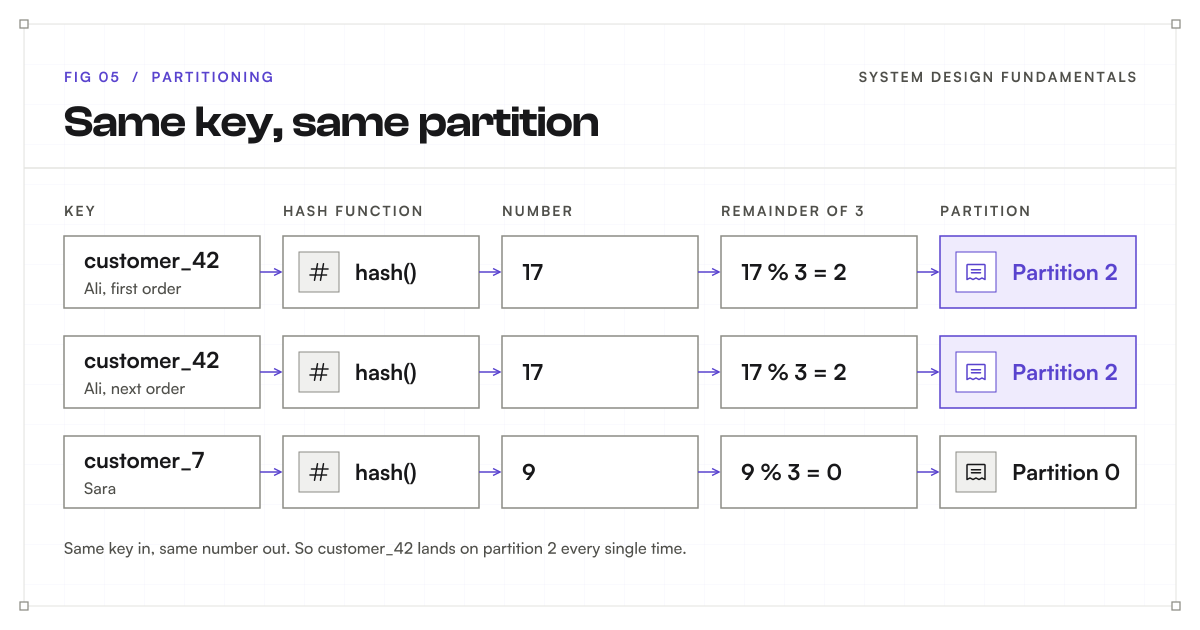
Kafka does the same thing using the key. The key is whatever you want to group your by: a customer ID, a user ID, or an organization ID. Kafka takes that key and runs it through a hash function, which turns any piece of text into a number. The same text always turns into the same number. Then Kafka divides that number by the number of partitions and uses the remainder as the partition.
In short: partition = hash(key) % number of partitions. The % sign means “the remainder after dividing.”
Let’s try it:
- Ali’s customer ID is
customer_42. - The hash turns it into a number. Let’s say 17.
- We have three partitions: 0, 1, and 2.
- 17 divided by 3 is 5, with a remainder of 2.
- So Ali’s order goes to partition 2.
The next time Ali orders, customer_42 turns into the same number, 17, so it lands on partition 2 again. Every single time. A different customer, say customer_7, might hash to 9, and 9 divided by 3 leaves 0, so that customer’s orders all go to partition 0.
That is the whole trick: the same key always lands in the same partition.
Real Kafka uses a hash function called murmur2, and the numbers it produces are much bigger than 17. The idea is exactly the same.
The ordering promise
This gives us one of Kafka’s most important guarantees:
Kafka keeps events in order inside a partition, but not across a whole topic.
Within partition 2, Ali’s orders are always in the order they were written. But if you look at the whole orders topic, an event on partition 0 and an event on partition 2 have no fixed order between them. They were written by different cashiers at different counters.
So the rule of thumb is simple. If order matters for something, use that thing as the key. If a customer’s events must be processed in order (placed, then paid, then shipped), use the customer ID or the order ID as the key.
What if there is no key?
Keys are optional. If an event has no key, Kafka has nothing to group it by, so it spreads keyless events across partitions to balance the load. Modern Kafka fills up a for one partition, then moves on to the next, which keeps things fast. This is fine for events where order doesn’t matter, such as page views.
Careful: adding counters later
Here is a trap that follows directly from the math above. Suppose the shop gets even busier, and you add a fourth partition.
The hash of customer_42 is still 17. But now Kafka divides by 4 instead of 3, and 17 divided by 4 leaves 1. Ali’s new orders go to partition 1, while Ali’s old orders are still sitting on partition 2. Kafka does not move old events when you add partitions.
For a short while, Ali’s orders live on two different rolls, and a might process a new order before an older one. The ordering promise from the last section quietly breaks for every key that moved.
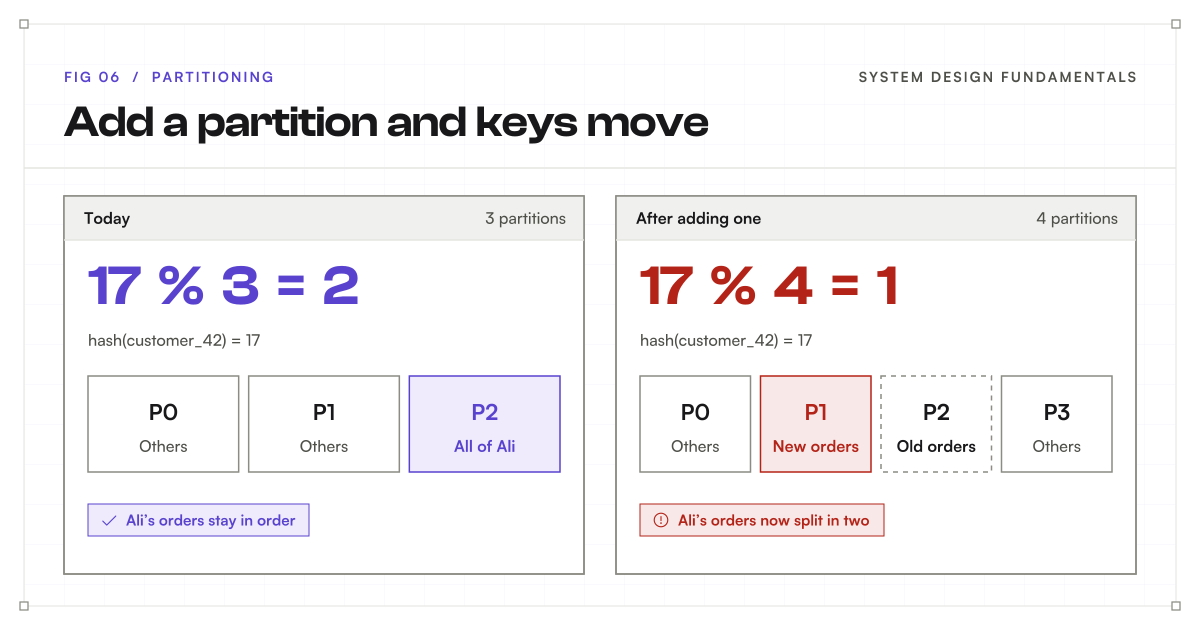
This is why teams try to choose a partition count with room to grow up front. You can add partitions to a topic later, but you cannot remove them, and adding them moves keys around. It is a common interview follow-up question, so it is worth remembering.
Hot counters
Hashing spreads keys evenly on average. But what if one customer places a thousand times more orders than everyone else? All of that customer’s orders go to one partition, and that one counter is overloaded while the others sit quiet.
This is called a hot partition, and it is the Kafka version of a hot spot in a sharded database. Common fixes are to choose a key with more variety (for example, order ID instead of store ID, if per-store ordering isn’t needed) or to add a little extra to the key for very busy customers so their events spread out.
Key terms
- Topic: a named category of events, such as orders.
- Partition: one slice of a topic; its own append-only log with its own offsets.
- Key: the value Kafka uses to choose a partition.
- Hash function: turns text into a number, always the same number for the same text.
- Hot partition: one partition getting far more traffic than the rest.
Branches and carbon copies: brokers and replication
Brokers and clusters
Our shop has grown again. It no longer fits in one building, so the counters are spread across several branches.
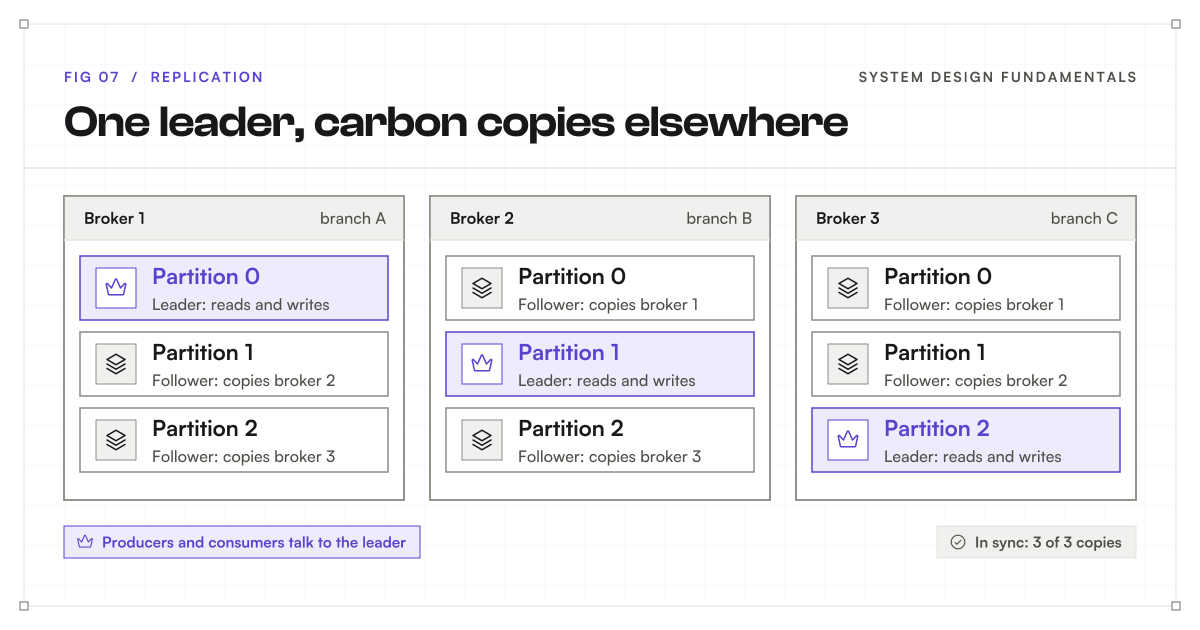
In Kafka, each branch is a called a broker. A group of brokers working together is called a cluster. The of a are spread across different brokers, so no single machine carries all the load. Partition 0 might live on broker 1, partition 1 on broker 2, and partition 2 on broker 3.
Leaders and followers
But what happens if one branch catches fire? Every receipt roll inside it is gone.
To protect against this, the shop keeps carbon copies. Every roll has one main copy, kept by the head cashier, and the same roll is copied to other branches.
In Kafka, this is called replication. Every partition has one leader and some followers:
- The leader is the main copy. write to it, and read from it.
- The followers live on other brokers. They keep copying new from the leader, so they always have a recent copy of the roll.
The number of copies is called the replication factor. A replication factor of 3, which is the common choice for important data, means one leader plus two followers on three different brokers.
Kafka also spreads leaders out. Broker 1 might lead partition 0 while holding follower copies of partitions 1 and 2. That way, every broker shares both the writing work and the copying work.
Just like a primary database and its replicas
If you have worked with , this will feel familiar. It is very much like a primary database with . The primary takes all the writes, the replicas keep copying from it, and if the primary goes down, a replica takes over. In Kafka, the leader is the primary and the followers are the replicas.
There is one difference worth knowing. With databases, we often send reads to the replicas to spread the load. In Kafka, by default, both reads and writes go to the leader, and followers are mostly there as backups. (Newer Kafka versions can let consumers read from a nearby follower, for example one in the same data center, but that is an opt-in setting.)
In-sync replicas and failover
Not every follower is always fully caught up. A follower on a slow or busy machine might fall a little behind. The followers that are fully caught up with the leader are called in-sync replicas, often shortened to ISR.
If the branch with the leader goes down, Kafka promotes one of the in-sync followers to be the new leader. Producers and consumers switch to the new leader, and the shop keeps running without losing confirmed orders. Because only in-sync followers are allowed to take over, the new leader already has every confirmed order.
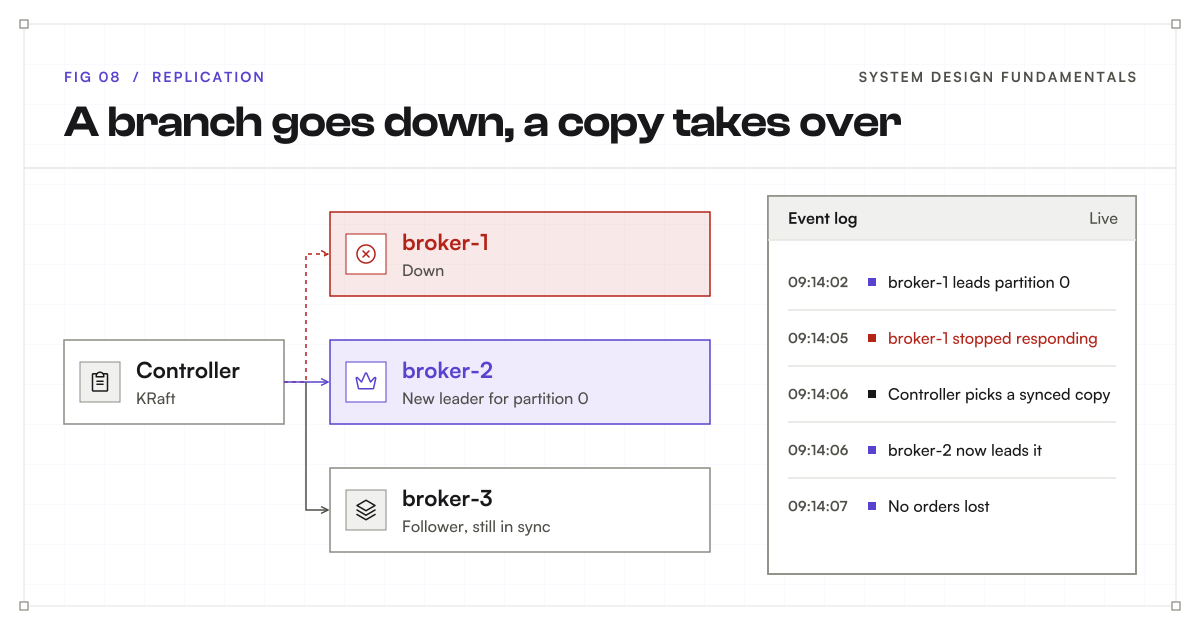
This is the same failover and redundancy pattern from the fundamentals post, applied to every single partition.
Key terms
- Broker: one Kafka server.
- Cluster: a group of brokers working together.
- Replication factor: how many copies of each partition exist.
- Leader: the copy that takes reads and writes.
- Follower: a copy on another broker that keeps up with the leader.
- In-sync replica (ISR): a follower that is fully caught up.
The cashier: producers
Now let’s meet the people in our shop. First, the cashier. The cashier takes the order from the customer and puts it on the roll.
In Kafka, this is the producer. A producer is any application that writes into Kafka, such as your order service. The producer decides the , sets the key, and sends the event to the of the right .
Batching: one trip for many orders
A good cashier does not run to the roll after every single order. They collect a few orders and carry them over together.
Think of a waiter who takes the order for the whole table before walking to the kitchen, instead of walking back and forth for each person. Kafka producers do the same thing. They group events headed to the same partition and send them in one request. This is called batching.
Fewer trips means much higher . The cost is a tiny delay: the producer may wait a few milliseconds to fill a batch. Kafka lets you tune this trade-off with two settings: batch.size (how big a batch can get) and linger.ms (how long to wait for more events). Batches can also be compressed, which saves network and disk space.
Acks: when do you say “done”?
Here is an important question. After sending an order, when should the cashier tell the customer “your order is placed”?
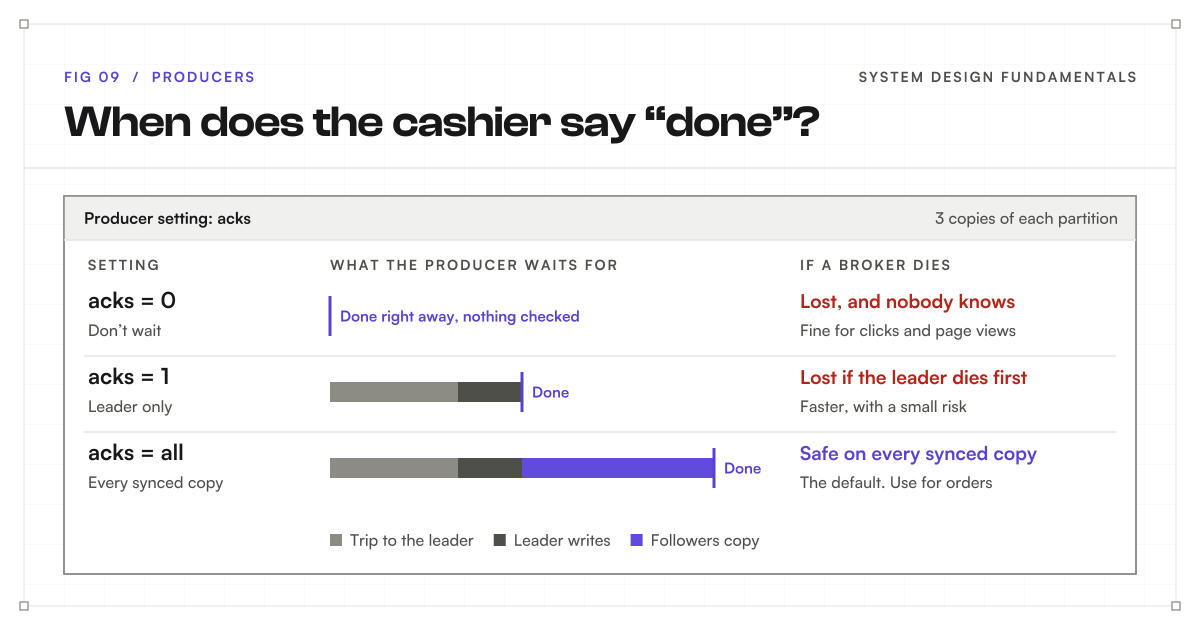
Kafka gives you three choices, set with a producer setting called acks. Acks is short for acknowledgement, which is just a reply that says “got it.”
acks = 0: don’t wait. The cashier sends the order and immediately tells the customer “done,” without waiting for any reply. It is the fastest option. But if the order is lost on the way, nobody will ever know. Use it only when losing a few events is acceptable, such as tracking page views or clicks.
acks = 1: wait for the leader. The cashier waits until the head cashier says “got it, it’s on my roll,” then tells the customer “done.” This is safer. But there is still a gap. If the head cashier’s branch goes down right after saying “got it,” before the carbon copies are made, that order is lost.
acks = all: wait for every in-sync copy. The cashier waits until the head cashier and every in-sync carbon copy say “got it.” Only then does the customer hear “done.” It is the slowest of the three, because you wait for more replies. But it is the safest, because the order now exists in more than one branch. For important data like orders and payments, this is what you use. Since Kafka 3.0, acks = all is the default.
| Setting | Waits for | Speed | Risk |
|---|---|---|---|
acks = 0 |
Nothing | Fastest | Lost events go unnoticed |
acks = 1 |
The leader | Fast | Lost if the leader dies before copying |
acks = all |
Every in-sync copy | Slowest | Safe while one in-sync copy survives |
This is the same trade-off as strong versus eventual consistency in the fundamentals post: waiting for more copies to agree costs time, and in return you get safety.
The fine print on “all”
There is one catch hiding in acks = all. It means “every in-sync copy,” not “every copy.” If both fall behind and drop out of the in-sync list, the leader is the only in-sync copy left. At that point, acks = all quietly behaves like acks = 1.
To stop this, Kafka has a topic setting called min.insync.replicas. It says: “refuse writes unless at least this many copies are in sync.” A common safe setup is:
- Replication factor 3.
min.insync.replicas = 2.acks = allon the producer.
With this setup, every confirmed write exists on at least two . If too many brokers fail, Kafka rejects new writes with an error instead of pretending they are safe. The cashier would rather say “sorry, we can’t take orders right now” than lose one.
Retries without duplicates
If a producer doesn’t hear “got it,” it . But what if the first write actually worked and only the reply was lost? Then a retry would add the same order twice.
Modern Kafka solves this with the idempotent producer, which is on by default. Each producer numbers its batches, and the broker ignores a batch it has already written. Retries become safe, just like the idempotency from the fundamentals post.
Key terms
- Producer: an application that writes events into Kafka.
- Batching: sending many events in one trip.
- Acks: how many copies must confirm a write before it counts as done.
- min.insync.replicas: the fewest in-sync copies allowed before writes are refused.
- Idempotent producer: retries never create duplicates.
The kitchen: consumers
On the other side of the shop, the kitchen reads orders from the roll. The kitchen is the consumer. A consumer is any application that reads from Kafka.
Consumers pull, nobody pushes
An important detail: the kitchen pulls orders from the roll at its own speed. Nobody pushes orders at the kitchen.
If the kitchen is slow, orders simply wait safely on the roll. If the kitchen goes offline for an hour, the orders are still there when it comes back. This is a big part of why Kafka decouples services so well. The cashier never has to know how fast the kitchen is, or whether it is even open.
Bookmarks: committed offsets
As the kitchen works, it keeps a bookmark on the roll that says “we have finished everything up to order 42.” If the cook goes on a break and comes back, they don’t start from the beginning. They look at the bookmark and continue from order 43.
In Kafka, this bookmark is called a committed offset. Each consumer saves how far it has read, and after a crash or a restart, it continues from exactly that point. Kafka stores these bookmarks itself, in a special internal , so the consumer doesn’t need its own to remember them.
When to move the bookmark
Here is a subtle question that matters a lot in practice: does the cook move the bookmark before cooking an order, or after?
Bookmark first, then cook. The cook reads order 43 and moves the bookmark past it. Then the cook crashes before making the coffee. On restart, the bookmark says 43 is done, so the cook continues from 44. Order 43 is never made. This is called at-most-once delivery: each event is processed once or not at all.
Cook first, then bookmark. The cook reads order 43 and makes the coffee. Then the cook crashes before moving the bookmark. On restart, the bookmark still points at 43, so the coffee gets made again. This is called at-least-once delivery: nothing is lost, but some events may be processed twice.
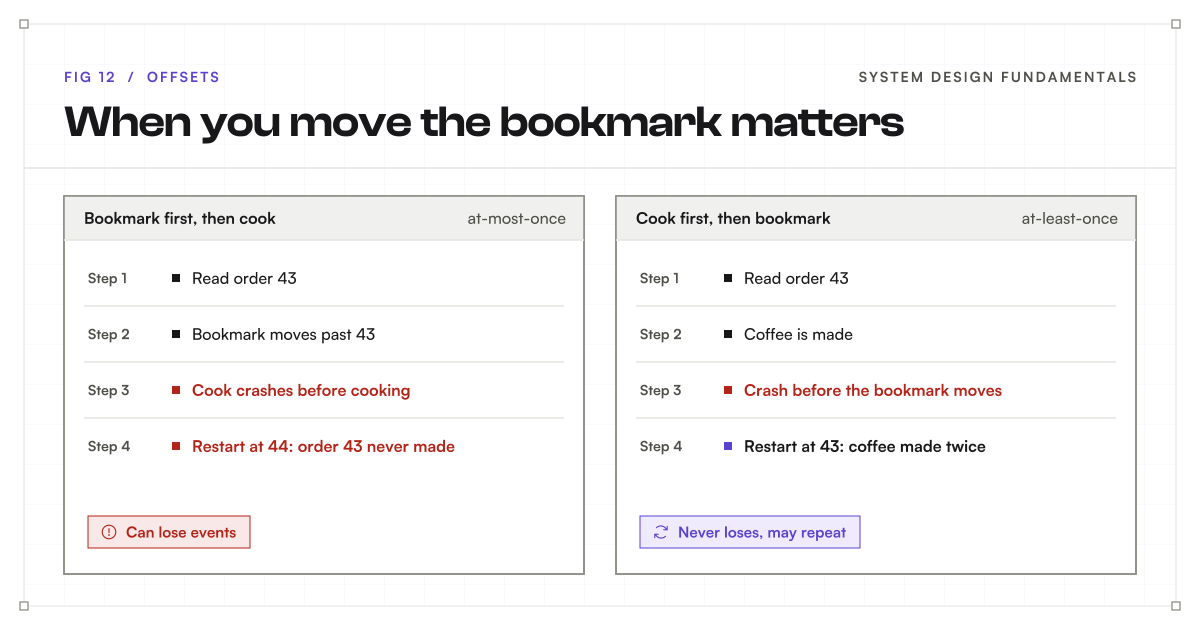
Most systems choose at-least-once and then make processing idempotent, so handling the same event twice is harmless. For example, the payment service checks “have I already charged for order 43?” before charging. Kafka also offers exactly-once processing through transactions, for pipelines that read from Kafka, process, and write back to Kafka. It is powerful, but it adds complexity, and idempotent handlers cover most real needs.
Consumer groups: a team of cooks
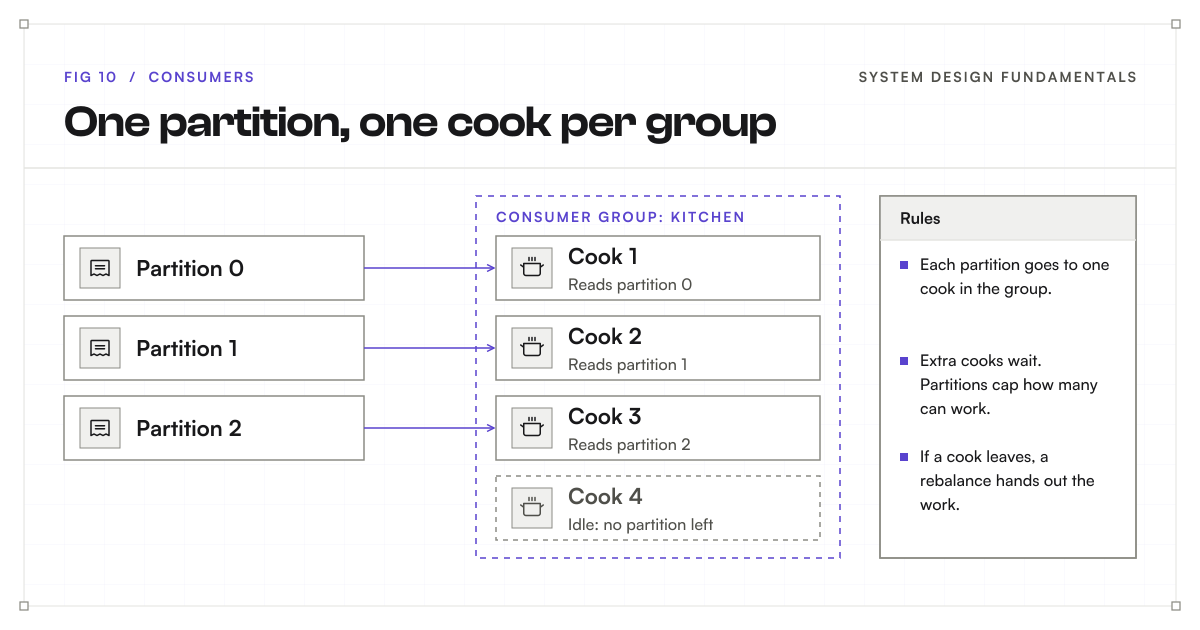
One cook cannot handle three busy counters alone. So the kitchen brings in more cooks, and they split the work. Cook 1 reads counter 0, cook 2 reads counter 1, and cook 3 reads counter 2.
In Kafka, this team of cooks is called a consumer group. Within a group, each is read by exactly one consumer at a time. That is how Kafka guarantees no order gets cooked twice by the same team, and it is also how the per-partition ordering promise survives: one partition, one reader, in order.
What if you add a fourth cook while there are only three counters? That fourth cook just stands there with nothing to do. The number of partitions limits how many consumers in a group can work in parallel. This is another reason to choose your partition count carefully: it is the ceiling on how far you can scale your consumers.
Rebalancing
Cooks come and go. Someone’s shift ends, someone new arrives, or a cook crashes. When that happens, the counters need to be handed out again so every counter still has exactly one cook.
Kafka calls this a rebalance. When a consumer joins or leaves a group, or stops sending heartbeats because it crashed, Kafka reassigns its partitions to the remaining members. The new owner picks up from the last committed offset, which is exactly why the bookmark matters. Rebalances used to pause the whole group briefly; newer versions of Kafka make them much smoother by only moving the partitions that need to move.
Consumer lag
How do you know if the kitchen is keeping up? You compare the bookmark with the end of the roll.
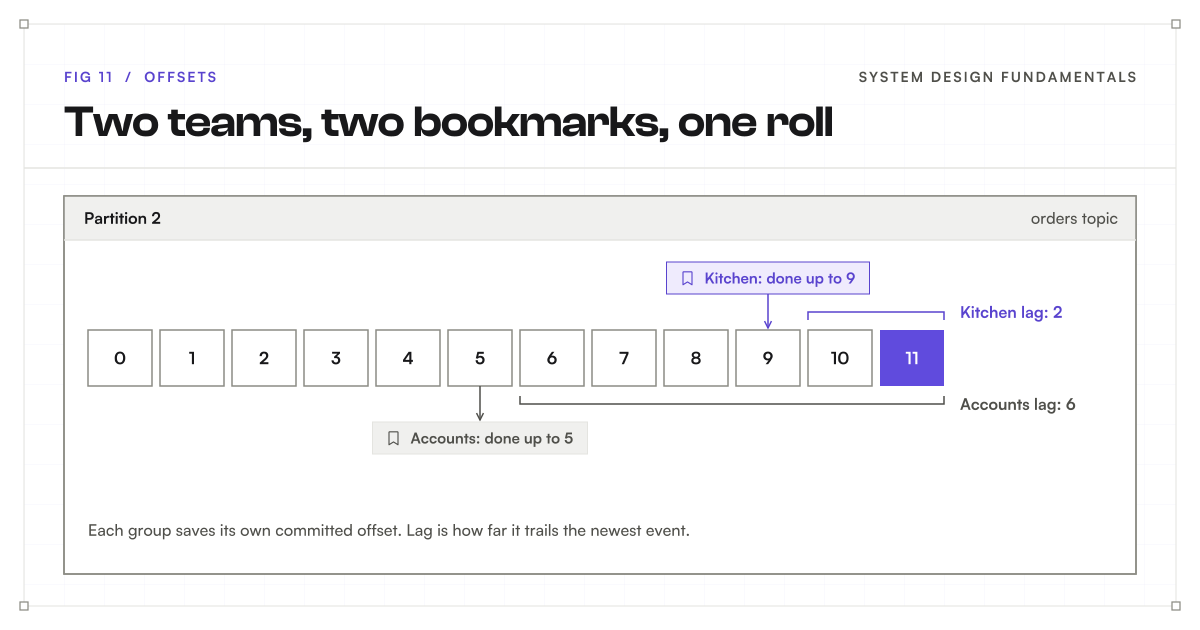
If the newest order on a partition is 11 and the kitchen has finished up to 9, the kitchen is 2 orders behind. This gap is called consumer lag, and it is one of the most important numbers to watch in any Kafka system. Lag that stays small is healthy. Lag that keeps growing means the consumers cannot keep up, and you need faster processing or more consumers (and possibly more partitions).
Key terms
- Consumer: an application that reads events from Kafka at its own pace.
- Committed offset: the saved bookmark of how far a consumer has read.
- At-most-once / at-least-once: lose some events, or possibly repeat some.
- Consumer group: a team of consumers that splits a topic’s partitions.
- Rebalance: handing out partitions again when group members change.
- Consumer lag: how far a group is behind the newest event.
Many teams, one roll
Here is the really powerful part. The kitchen is not the only team that cares about orders. The accounts team also needs every order to track sales.
The accounts team doesn’t take orders away from the kitchen. They read the same roll, with their own bookmark. The kitchen might be finished up to order 9 while accounts is only up to order 5. Neither team affects the other.
In Kafka, every consumer group gets every event, independently. Your email service, your analytics service, and your inventory service can each be its own consumer group, all reading the same orders , each at its own speed. Each group has its own and its own .
So there are two ways to add readers, and they do different things:
- Add a consumer to an existing group to share the work. The team gets faster.
- Add a new consumer group to get a full, separate copy of the stream. A new team joins.
This is what fixes the shouting problem from the start of the post. The order service writes each order once. Any number of services can read it later, without the order service knowing or caring who they are. Adding a fraud-check service next year means creating one new consumer group, with no change to the order service at all.
Nothing gets thrown away: retention and replay
This brings us to one of the biggest differences between Kafka and a normal message queue.
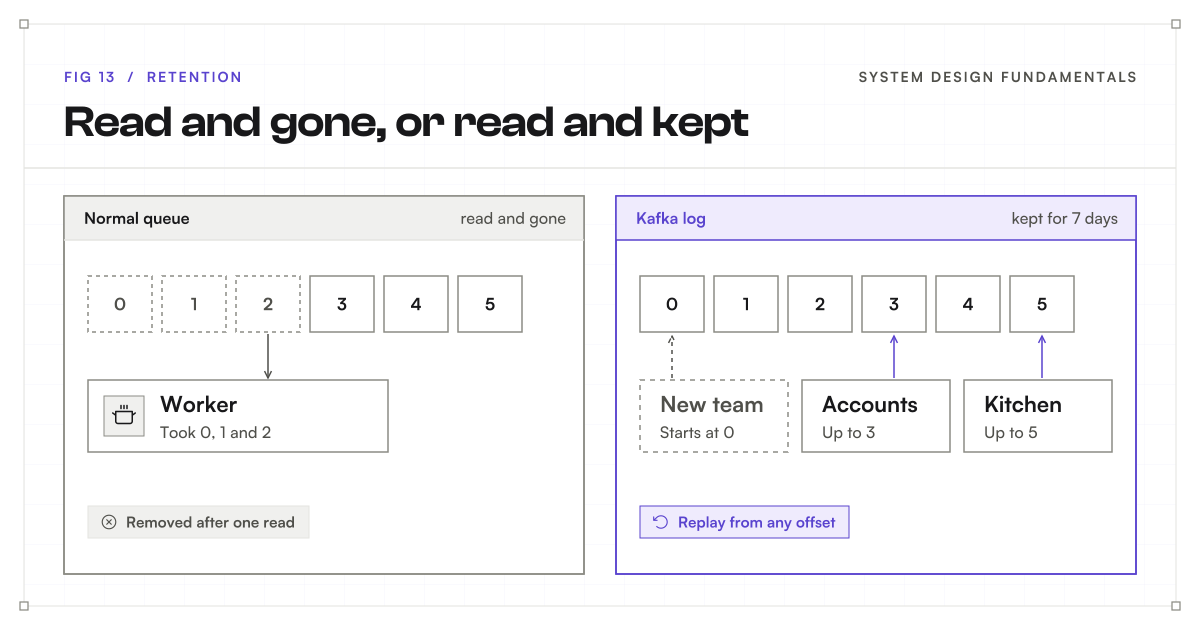
In a normal queue, once a message is read and acknowledged, it is deleted. The queue’s job is to hand out work, and finished work is gone.
In Kafka, reading does not delete anything. The shop keeps its receipt rolls for, say, seven days, no matter who has read them. In Kafka, this is called retention. By default, Kafka keeps for seven days, and you can set it by time (keep 30 days), by size (keep 500 GB), or forever.
Because the data is still there, two very useful things become possible:
- A new team can start from the beginning. A new analytics service can join today and read every order from the last seven days, from 0.
- You can replay after a bug. If your service processed a week of events wrongly, you can fix the code, move its bookmark back, and process them again.
| Normal queue | Kafka | |
|---|---|---|
| After a message is read | Deleted | Kept until retention ends |
| Many teams reading the same data | Needs a copy per team | Each group reads the same log |
| Replay old messages | Not possible | Move the bookmark back |
| Ordering | Usually per queue | Per partition |
| Best at | Handing out jobs to workers | Streams of facts many teams read |
Log compaction: keep only the latest
Sometimes you don’t need every old slip. Imagine a of customer addresses. When Ali moves house three times, you only care about the latest address.
For this, Kafka has a special cleanup mode called log compaction. Instead of deleting events by age, it keeps only the latest event for each key. Older slips for the same key are removed in the background, and the slips that remain keep their original offsets.
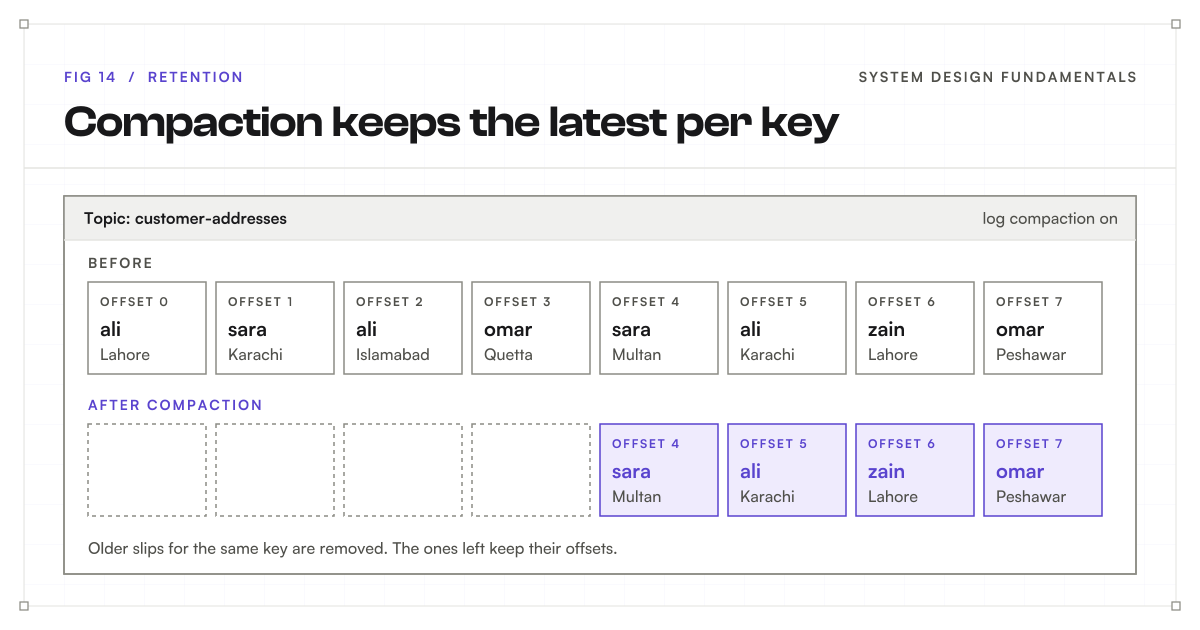
A compacted topic works like a table that remembers the current value for every key. A new service can read it from the start and rebuild the full current state. To delete a key completely, you write an event with that key and an empty value, called a tombstone, and compaction eventually removes the key.
Key terms
- Retention: how long Kafka keeps events, whether or not they were read.
- Replay: moving a bookmark back to process old events again.
- Log compaction: keeping only the latest event per key.
- Tombstone: an event with an empty value that deletes a key from a compacted topic.
How Kafka is so fast while writing to disk
At this point you might be wondering: if Kafka writes everything to disk, how can it handle millions of per second? Disks are supposed to be slow.
The answer is our receipt roll.
Sequential writes
Writing on the roll is always “the next line.” The cashier never searches for a spot or flips back through old pages. Disks, even old spinning ones, are very fast when you write like this, one line after another. This is called sequential writing. What makes disks slow is random access: jumping around to read and write in many different places. An never does that.
Reading is mostly sequential too. A reads from its bookmark forward, line after line.
Batching and the page cache
On top of that:
- Batching means each disk write and each network trip carries many events at once.
- Kafka leans on the operating system’s page cache, the memory the OS uses to keep recently used file data. Recent events are usually still in memory, so a consumer that is keeping up reads them without touching the disk at all.
Zero-copy
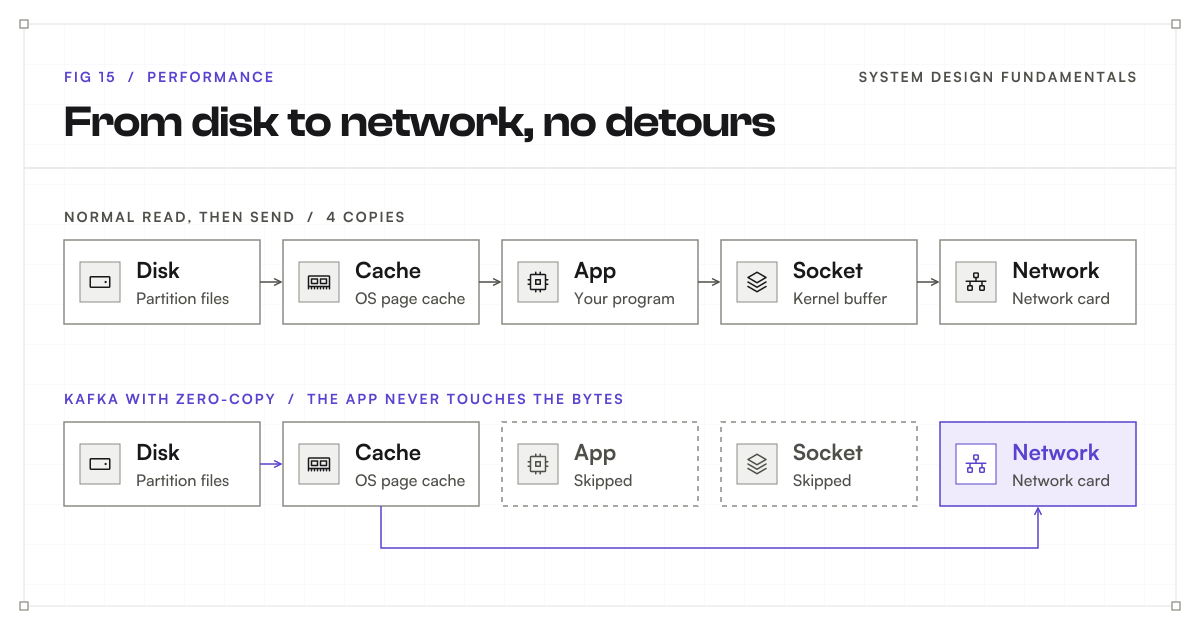
Finally, when sending data to consumers, Kafka avoids extra copying. Normally, sending a file over the network means copying the data from disk into the page cache, then into the application’s memory, then into a network buffer, and then out to the network card.
Kafka skips the middle steps. Because events are stored on disk in the same format they are sent in, Kafka can ask the operating system to pass data straight from the page cache to the network. The application never touches the bytes. This is called zero-copy. (One caveat: when traffic is with , the data has to be encrypted first, so this shortcut does not apply.)
What it looks like on disk
Under the hood, each is just a folder of files. Kafka keeps appending to the end of the newest file. When a file gets big enough, Kafka closes it and starts a new one, called a segment. simply deletes the oldest segment files.
orders-2/
  00000000000000000000.log     events at offsets 0 to 9,999
  00000000000000000000.index   offset -> position in the .log file
  00000000000000010000.log     events from offset 10,000 (newest)
  00000000000000010000.index
Each segment is named after the first inside it. The small index file maps offsets to positions, so Kafka can jump to any offset quickly without scanning the whole file.
The manager’s board: ZooKeeper and KRaft
There is one last piece. Someone in the shop has to keep track of which branches are open and who the head cashier is for each roll. And when a branch burns down, someone has to decide who takes over.
The shop has a manager with a board on the wall that holds all of this information.
In Kafka, this job used to belong to a separate system called ZooKeeper. You had to run and maintain ZooKeeper alongside Kafka, which meant two systems to , monitor, and secure.
Modern Kafka has this built in. It is called KRaft (Kafka plus Raft, the name of the agreement method it uses). A small group of act as controllers. They store the ’s information, such as which brokers are alive and which broker leads each . When a broker goes down, the controllers pick a new from the in-sync . Since Kafka 4.0, KRaft is the only option, and ZooKeeper is gone.
One order, start to finish
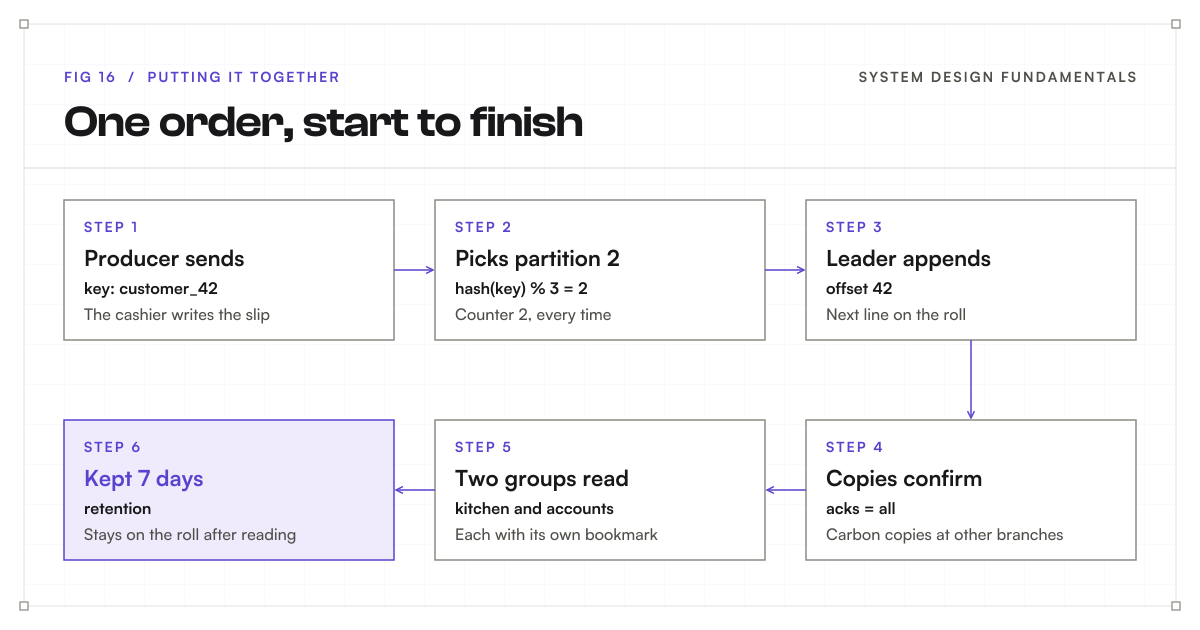
Now let’s put it all together by following one order through the shop.
- The producer sends. Ali walks in and orders two coffees. The cashier writes a slip with Ali’s customer ID,
customer_42. In Kafka, the cashier is the producer, and the slip is an with keycustomer_42. - The key picks the partition.
customer_42always goes to counter 2. In Kafka, the of the key, divided by 3, leaves 2, so the event goes to partition 2. - The leader appends. At counter 2, the head cashier adds the slip to the end of the roll and gives it the next number. In Kafka, the leader for partition 2 appends the event and gives it 42.
- The copies confirm. Before saying “got it,” the head cashier makes sure the carbon copies at the other branches have the slip too. In Kafka, that is replication, with
acks = all. - Two groups read. The kitchen picks up the slip, makes the coffees, and moves its bookmark forward. That is a committing its offset. At the same time, the accounts team reads the very same slip to record the sale, using its own bookmark. That is a second consumer group getting the same event.
- The slip is kept. The slip stays on the roll for seven days, even after everyone has read it. In Kafka, that is .
When not to use Kafka
Kafka is powerful, but it is not free. A is several to run, monitor, and upgrade, and it brings real concepts your team must learn: , , , and . Managed services such as Confluent Cloud or Amazon MSK reduce the operating work, but not the learning.
Kafka may be more than you need when:
- You just need background jobs. Sending a welcome email after sign-up is a job for a simple task queue such as RabbitMQ, Amazon SQS, or a Redis-based queue.
- Only one service ever reads the messages, and nobody needs replay.
- Traffic is small. A few hundred a minute can live comfortably in a table or a simple queue.
- You need request and response. If the caller needs an answer right now (“is this card valid?”), a direct call is the right tool. Kafka is for things that already happened, not questions that need an immediate reply.
Kafka shines when many teams need the same stream of facts, when traffic is high, when you want to replay history, or when you are moving data between many systems.
Kafka at a glance
| In the shop | In Kafka | What it does |
|---|---|---|
| Receipt roll | Log | Append-only list of events |
| Line number | Offset | Position of an event, starting at 0 |
| Order slip | Event (record) | Key, value and timestamp |
| Separate rolls | Topics | Categories of events |
| Counters | Partitions | Split a topic so work runs in parallel |
| Customer ID decides the counter | Key hashing | Same key, same partition, in order |
| Branches | Brokers | Servers that store partitions |
| All branches together | Cluster | Brokers working as one system |
| Head cashier and carbon copies | Leader and followers | Replication for safety |
| Copies that are caught up | In-sync replicas | Allowed to become the new leader |
| Cashier | Producer | Writes events |
| When to say “done” | Acks | How many copies must confirm |
| Kitchen | Consumer | Reads events at its own pace |
| Bookmark | Committed offset | Where a consumer will continue |
| Team of cooks | Consumer group | Splits partitions between members |
| Accounts team with its own bookmark | Another consumer group | Gets every event independently |
| Rolls kept for seven days | Retention | Events stay after they are read |
| Only the latest slip per customer | Log compaction | Keep the newest event per key |
| Manager’s board | KRaft controllers | Track brokers and pick leaders |
The one thing to remember
If you remember one thing from this post, remember the receipt roll. Kafka keeps adding to the end of a , splits that log into , copies each partition to other so nothing gets lost, and lets every team read it at its own pace.