Projects and tasks
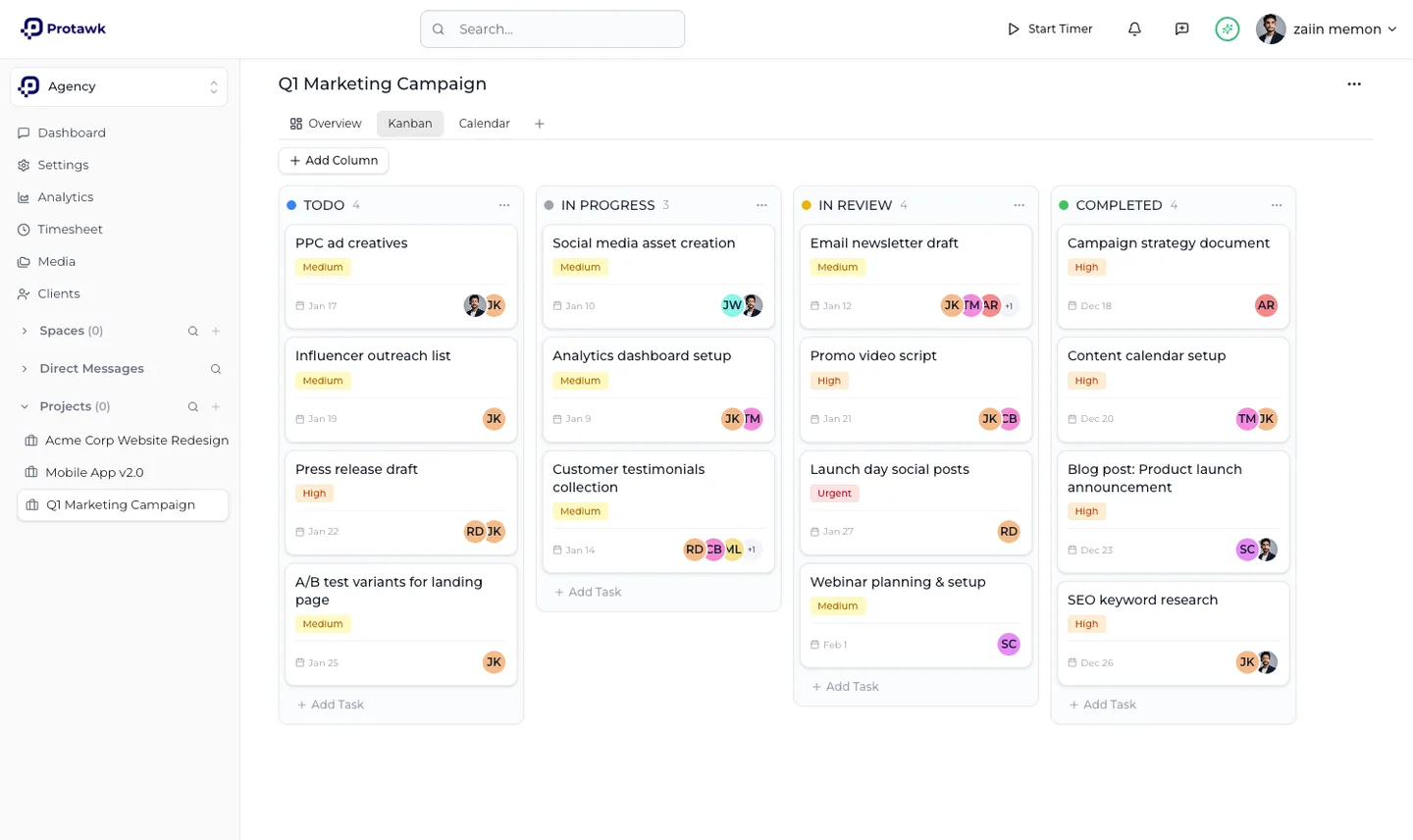
Multiple workspaces, each with its own projects. Tasks take multiple assignees and can be viewed as a board, a calendar or an overview, so the same work reads differently depending on what you are checking.
Founder, product and engineering
An all-in-one project management and team workspace for freelancers, agencies and small teams. I made the product decisions, designed the architecture, wrote the code and shipped the billing.
Freelancers and small teams get squeezed from both ends. Enterprise project tools want a week of setup, mandatory fields and someone to administer them. The lightweight ones are pleasant until a client needs visibility, at which point there is no way to share part of a project without handing over the whole workspace.
What people do instead is spread one project across four tools and a group chat. Tasks in one place, files in another, hours in a spreadsheet, client updates over email. Nothing is wrong individually, but the project has no single place where its current state actually lives.
Protawk is one workspace that covers the whole job rather than another single purpose tool bolted onto the pile. Projects, tasks, files, time, messaging and client sharing sit in the same system, so the state of a project is a place you can open rather than something you reassemble.
The scope was decided by what the product refuses to do. It is built for teams of two to ten. It is explicitly not for enterprises with hundreds of employees, and not for engineering teams that want sprint planning and velocity charts. Saying no to both kept the setup short enough that a freelancer can start a project on the day they sign up.
Multiple workspaces, each with its own projects. Tasks take multiple assignees and can be viewed as a board, a calendar or an overview, so the same work reads differently depending on what you are checking.
Share selected work with a client without exposing the workspace behind it. This is the feature that decides whether a small team can use one tool instead of two.
Tracking built into the same place the work lives, so hours attach to tasks and projects rather than being reconstructed from memory at the end of the month.
Channels, threaded comments on the work itself, and direct messages. Discussion stays attached to what it is about instead of scrolling away in a separate chat app.
Project files stored alongside the project, with storage that scales by plan rather than by a separate subscription somewhere else.
Task completion, workspace activity and time logged, so the person running the team can answer where a project actually is without asking everyone.
The client portal is the reason the permission model had to be right at the start rather than retrofitted. Sharing a project with someone outside the workspace means every read path has to know who is asking, not just what they asked for. Getting that wrong later would have meant rewriting most of the data access layer.
Each tier caps storage, team members and workspaces. Those limits show up inside the product, when someone invites a tenth member or creates a workspace, so entitlements had to be something the application understands rather than a field the payment provider owns.
Workspaces, spaces and projects nest, and everything belongs to a tenant. Deciding that up front is unglamorous and it is what stops the product from falling over once accounts other than your own start using it.